Funktionen
Numbers in Both Views
Each note gets a finger label on the falling-note piano roll and a matching number on the sheet music, so the hand shape you watch is the hand shape you read.
Works on Files You Already Own
Import a MIDI or MusicXML file and fingerings are generated for it too. Useful for pieces exported from a DAW, downloaded, or written in notation software.
Show Them or Hide Them
A Finger numbers switch puts them on the score or clears them away. New scores open with sheet fingerings hidden, so flip it on when you want guidance.
Beispieltranskriptionen
Klick auf eine Karte, dann siehst du, was Songscription aus dem Stück macht.
Finger Numbers on the Page and the Roll
Noten
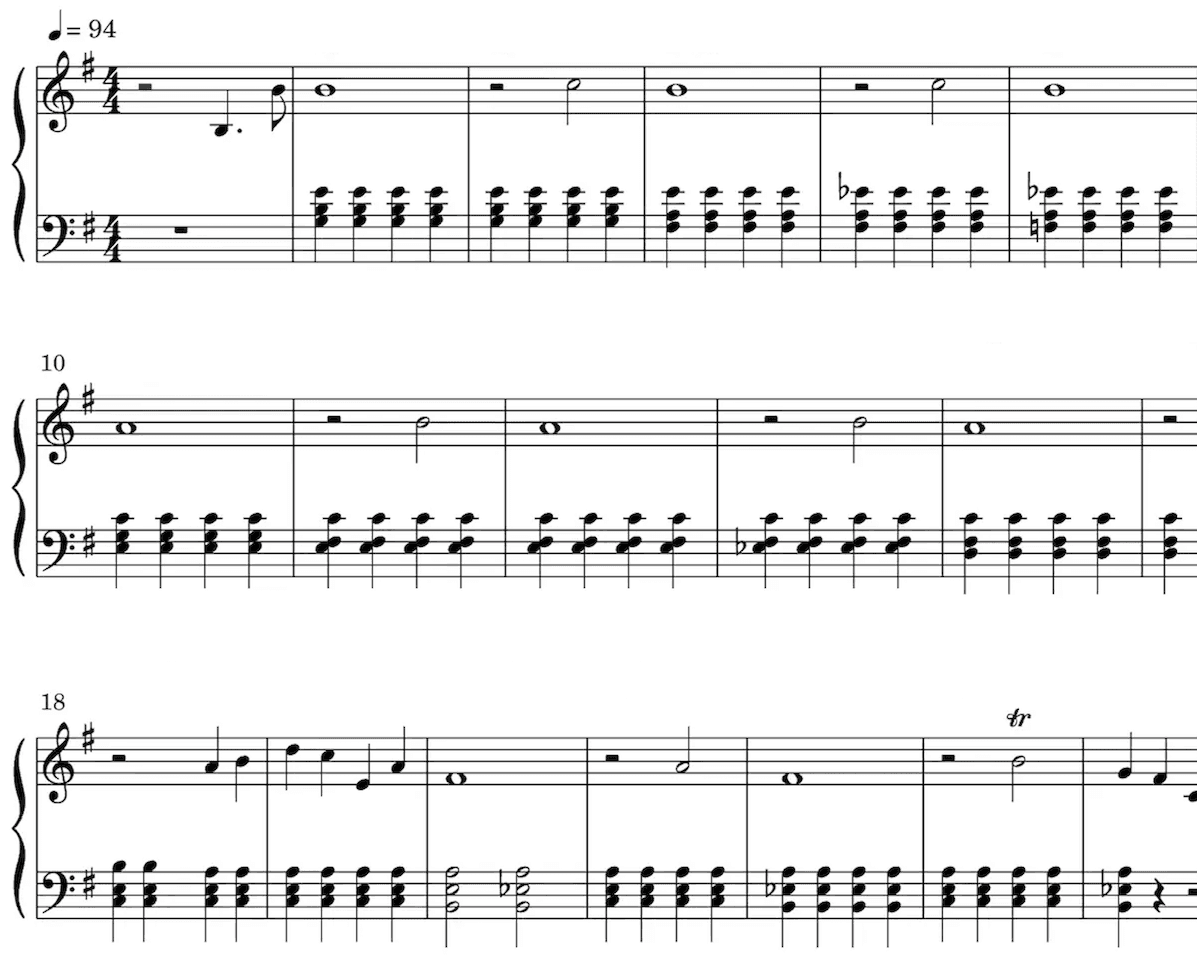
Unsere KI hört die Töne aus deiner Aufnahme heraus und schreibt sie als Noten auf. Taktart und Tonart erkennt sie dabei automatisch, ebenso Triller, Staccato und viele andere Vortragszeichen.
Besonders nützlich sind Noten, wenn du klassisch ausgebildet bist, Musik lernst, unterrichtest oder selbst komponierst.
Spiel deine Noten ab und hör dir die Transkription an.
Mach die Wiedergabe so schnell oder langsam, wie du willst.
Bearbeite die Transkription.
Piano Roll
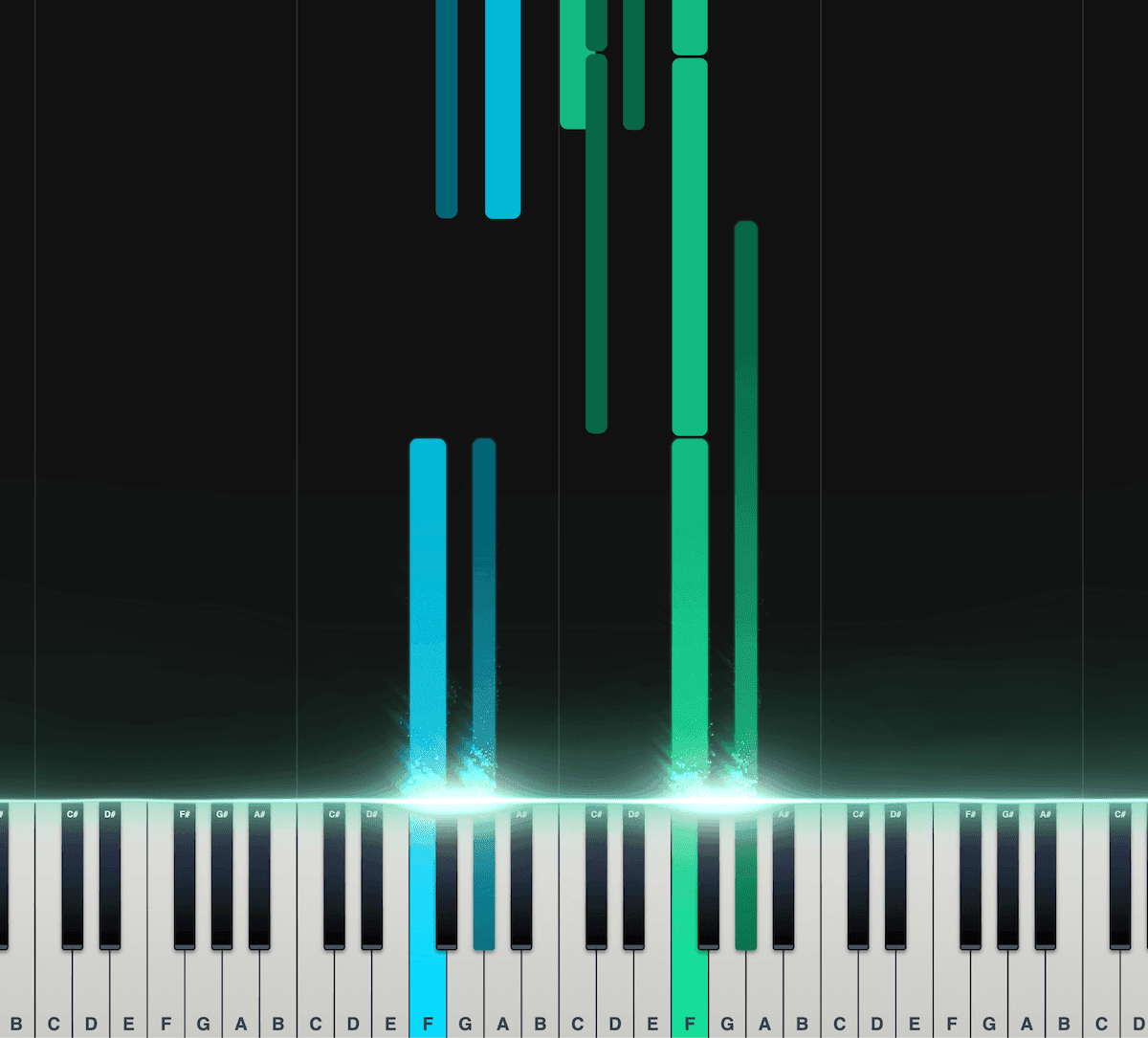
Unsere interaktive Piano Roll zeigt jeden Ton, während er auf die Klaviertastatur fällt. So siehst du genau, was wann gespielt wird.
Gut geeignet, wenn du noch nicht viel Übung darin hast, Noten oder andere Notationen zu lesen.
Teil die Töne auf linke und rechte Hand auf.
Stell Geschwindigkeit, Transponierung, Farben und mehr ein.
Exportier die Transkription als MIDI-Datei für deine DAW.
Beliebt bei Musiker:innen auf der ganzen Welt
Schließ dich Tausenden von Musiker:innen an, die mit Songscription anders an ihrer Musik arbeiten
"Es gibt so viele Songs, die ich spielen wollte, für die ich aber nie Noten finden konnte. Songscription löst dieses Problem endlich. Jetzt kann ich einfach die Aufnahme verarbeiten lassen und losspielen."
Tomer
"Ich habe einen Song komponiert, der mir seit Jahren am Herzen liegt. Es ist ein sehr persönliches Stück, das ich bisher nie richtig teilen konnte. Dank Songscription habe ich es endlich in Noten festgehalten. Jetzt können auch andere meine Komposition spielen und schätzen. Davon träume ich, seit ich diese Noten zum ersten Mal aufgeschrieben habe."

Tony
"Ich habe in meinem Leben so viele Songs geschrieben, die ich in meinen Händen halte, aber nie weitergeben konnte. Songscription hat mir eine neue Tür geöffnet. Zum ersten Mal habe ich eine bleibende Zeitkapsel meines Songs, den alle überall spielen können, heute und auch noch in ferner Zukunft."

"Ich komponiere am Klavier, und Songscription macht aus meinem Durcheinander richtige Noten."

Jeff
"Ein sehr genaues Tool, das viel Zeit spart. Ich lerne Jazzklavier und hätte ehrlich gesagt nicht erwartet, dass irgendeine Transkriptions-KI mit dem Stück, das ich ihr gegeben habe, gut zurechtkommt, weil es so schwierig und schnell ist. Aber die KI von Songscription hat mich eines Besseren belehrt."
"Songscription hat mir geholfen, meine eigenen Liveaufnahmen zu transkribieren, und mir bei dieser sonst eintönigen und zeitaufwendigen Aufgabe unzählige Stunden gespart."

Yameen Sekandari
Bekannt aus
Häufige Fragen
Noch Fragen? Schreib uns
Can Songscription add finger numbers to sheet music automatically?
Yes. Piano scores get finger numbers from 1 for the thumb to 5 for the pinky, generated automatically. They appear as labels on the piano roll and as numbers on the sheet music once you switch on Finger numbers.
Can I get piano fingering for a MIDI or MusicXML file?
Yes. Import the file and Songscription generates fingerings for it, just as it does for a song transcribed from audio. You then see them on the piano roll and, with the toggle on, on the sheet.
What do the finger numbers 1 to 5 mean?
They name the fingers. 1 is the thumb, 2 the index finger, 3 the middle finger, 4 the ring finger and 5 the pinky. The same numbering is used for the left hand and the right hand.
Does the fingering generator work for guitar or other instruments?
No. Finger numbers are generated for piano only. Guitar transcriptions come with tabs and notation instead, which show the string and fret for each note.
Is the fingering generator free to try?
Ja. Clips mit bis zu 30 Sekunden kannst du unbegrenzt kostenlos transkribieren, und für längere gibt es eine kostenlose Testphase. Mit einem bezahlten Abo bekommst du mehr Transkriptionszeit und kannst auch längere Dateien transkribieren.
How do I add finger numbers to a piano piece?
Bring the music into Songscription as a recording or as a MIDI or MusicXML file. Fingerings are generated for the piano part automatically, and the Finger numbers switch puts them on the score.
- Choose your source. Upload audio or video, paste a YouTube, TikTok or Instagram link, record in the browser, or import a MIDI or MusicXML file.
- Let it run as piano. This page is set to piano, so the result is a two-hand score with a finger worked out for every note.
- Switch on Finger numbers. New scores open with sheet fingerings hidden. Turn the toggle on and the numbers appear with the notes.
- Practice along with the roll. Open the piano roll to see the same finger labels on the falling notes while the song plays at the speed you set.
How do you read piano finger numbers?
Each number stands for one finger, and the scheme is identical in both hands: the thumb is always 1 and the pinky is always 5. Our explainer on piano finger numbers has more practice tips.
| Number | Finger | Worth knowing |
|---|---|---|
| 1 | Thumb | Often tucks under the hand to keep a scale going |
| 2 | Index finger | Strong and nimble, a natural leader for a line |
| 3 | Middle finger | The longest finger, a common crossing point over the thumb |
| 4 | Ring finger | Weaker in most hands, so it rewards slow, separate practice |
| 5 | Pinky | Often takes the top note in the right hand and the bass note in the left |
Where do the finger numbers show up?
In two places. On the piano roll every falling note carries a finger label, and on the sheet music the numbers sit with the notes once the Finger numbers toggle is on.
Seeing one fingering in both views helps when you are learning by eye and by ear together. The roll colors each hand differently, can hide one hand, slows playback down and shows note names, so you can drill the left hand alone with its fingering in view. The piano tutorial creator page covers the roll in more depth.
Which music can the fingering generator handle?
Any piano score in your account, whether it came from a recording or from a file you imported.
Songscription cannot read PDFs, photos or printed scores, so a paper copy has to become a MIDI or MusicXML file before it can get fingerings.
- Songs transcribed from audio or video with piano transcription
- MIDI files from a DAW or a download, brought in the same way as on MIDI to sheet music
- MusicXML files exported from notation software
- Piano covers of songs that have no piano in the original
What if a suggested fingering doesn't suit my hand?
Use what works for you, and let us know. Hands come in different sizes, so a suggested fingering will not fit everyone, and you can report wrong finger numbers straight from the score.
Those reports go to the team improving the fingering model. Teachers often treat the generated numbers as a first draft to talk through with a student, adjusting a finger or two where a hand is small or a stretch is wide.