Funciones
A Staff for Every Player
Rhythm section, vocals, horns and strings each get their own part on a multi-staff score, so nobody has to work out their line by ear.
Print or Share the PDF
Hand out a printed score at rehearsal, or send the PDF to the group chat so everyone can look it over before the first run-through.
A Part for Every Player
Every instrument gets its own linked part with multi-bar rests, so each player prints only their own music.
Partituras de ejemplo
Abre cualquier tarjeta y mira cómo funciona Songscription.
A Score the Whole Band Can Read From
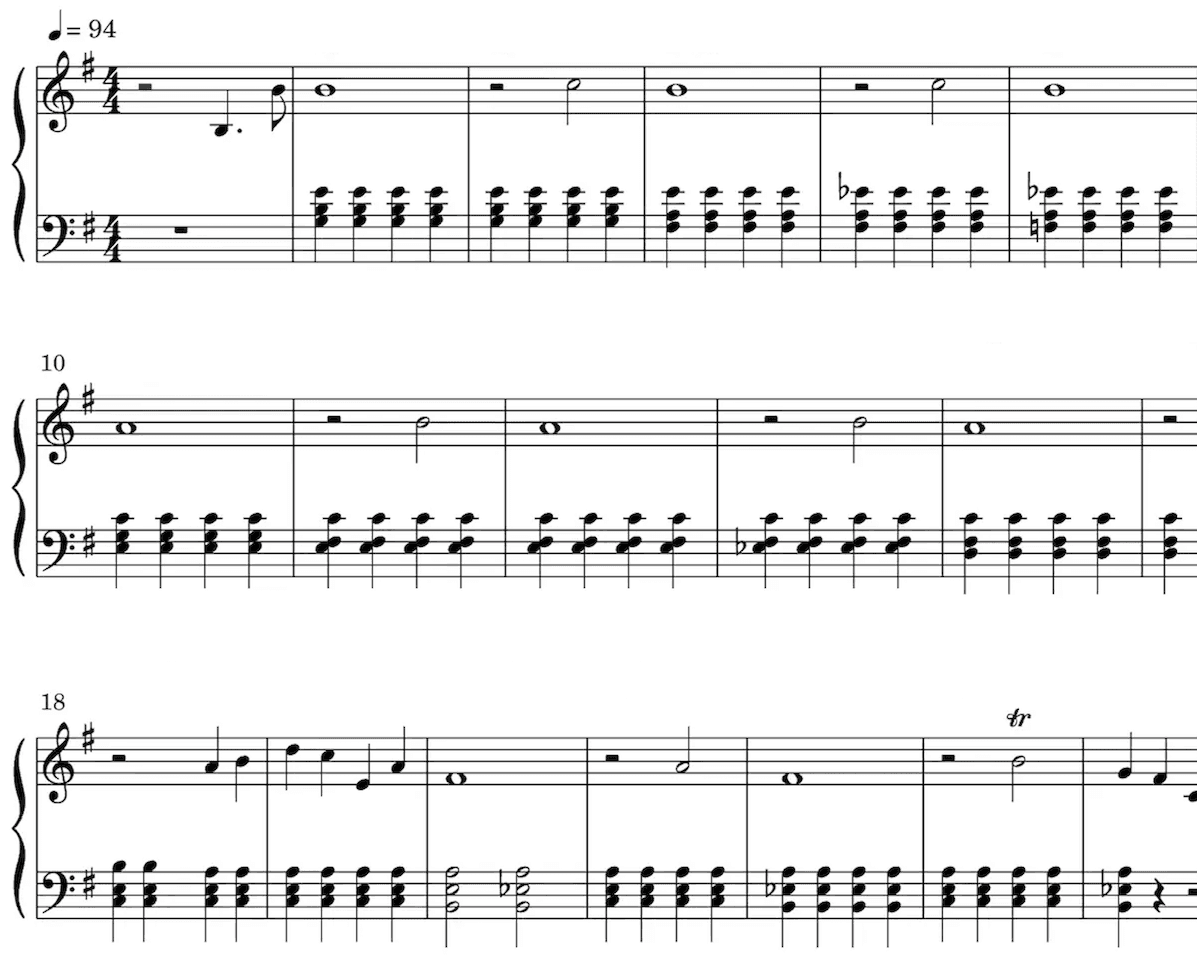
Partitura
Nuestra IA identifica las notas de tu grabación y las escribe en el pentagrama. También detecta automáticamente muchos otros elementos, como la indicación de compás y la armadura, o los trinos, el staccato y otras marcas de expresión.
La partitura es especialmente útil para quienes tienen formación clásica, para quienes estudian o enseñan música y para quienes componen.
Reproduce la partitura para escuchar la transcripción.
Sube o baja la velocidad a tu gusto.
Edita la partitura.
A músicos de todo el mundo les encanta Songscription
Únete a miles de músicos que cambiaron su manera de crear con Songscription
"Hay tantas canciones que he querido tocar y de las que nunca pude encontrar la partitura. Songscription por fin resuelve ese problema. Ahora solo tengo que pasarle el audio y ya puedo empezar a tocar."
Tomer
"Compuse una canción que llevo en el corazón desde hace años, una pieza muy personal que nunca había podido compartir como quería. Gracias a Songscription, por fin la convertí en una partitura. Ahora otras personas pueden interpretar y apreciar mi composición. Es un sueño que tengo desde que escribí esas notas."

Tony
"A lo largo de mi vida escribí tantas canciones que tengo en mis manos, pero que nunca pude transmitir a otras personas. Songscription me abrió una nueva puerta. Por primera vez, mi canción está guardada en una cápsula del tiempo para que cualquiera, en cualquier lugar, pueda tocarla ahora y dentro de muchos años."

"Compongo al piano y Songscription convierte mi desorden en una partitura de verdad."

Jeff

"Songscription me ayudó a transcribir mis propias grabaciones en vivo y me ahorró muchísimas horas en una tarea monótona que llevaba mucho tiempo."

Yameen Sekandari
Aparecimos en
Preguntas frecuentes
¿Tienes más preguntas? Escríbenos
Can I try band transcription for free?
Sí. Puedes transcribir clips de 30 segundos gratis y sin límite, y para los más largos hay una prueba gratuita. Los planes de pago dan más tiempo de transcripción y admiten archivos más largos.
Does it work for orchestra or choir recordings?
Partly. Multi-Instrument (beta) recognizes orchestral instruments, including strings, brass, woodwinds, harp and timpani, so a chamber group or a band with strings works. It is not a full-orchestra engine, and dense orchestral recordings with many instruments in the same range need more cleanup. A choir comes back as one voice track, not separate soprano, alto, tenor and bass parts, so plan to write out the harmony parts yourself.
Can I change the key for our singer?
Yes. Transpose the score in the editor and every part moves to the new key together, then print or export the transposed version.
Can I make band sheet music from a PDF or a photo of a score?
No. Songscription works from sound: audio files, video files, links and browser recordings. It can also import MIDI and MusicXML files, but it cannot read PDFs, photos or paper scores.
Can I get sheet music for every instrument in a song?
Yes. Multi-Instrument (beta) transcribes the rhythm section, the vocals and any horns or strings in one pass and sets them out as a multi-staff score, with the keyboard part split across two hands.
It is aimed at groups that rehearse from a recording: worship teams, cover bands, school jazz and rock bands, and small combos with sax, trumpet or strings. Big orchestral mixes and choirs are harder: the more instruments overlap, the more cleanup to expect, and a choir comes back as one voice part. Sheet music for every instrument in a song goes deeper on what to expect.
Who uses band charts made from a recording?
Anyone who has to teach a song to several players quickly and has no published parts to hand out.
- Worship leaders preparing a new song for this week's team, with the vocal melody, the band and any strings on one score
- School and jazz band directors who want a starting score, horn parts included, for a tune that has no published arrangement
- Cover bands learning a setlist, where every member needs a part before the first rehearsal
- Band leaders writing down what a recording does so a substitute player can sight-read the gig
How do I make band parts from a recording?
Upload the song, let Multi-Instrument transcribe it, check each part, then print or export. Leave time for a careful read-through, because the mode is still in beta.
Our walkthrough on band parts from a recording shows the whole rehearsal-prep routine.
- Upload the reference track. Use the recording your band is covering: an audio or video file, or a YouTube, TikTok or Instagram link.
- Review the full score. Play it back and follow along part by part. Fix wrong notes, move notes, change timing or add lyrics in the editor.
- Transpose if needed. Move the whole score to a key that suits your singer before anything gets printed.
- Print or export. Download the full score and each player's part as PDFs.
Can I print a separate part for each musician?
Yes, and it happens automatically. Every instrument in the score gets its own linked part with its own layout and multi-bar rests, and Download gives you the full score and each part as separate PDFs. Fix a note in the score and the part follows. Extract parts from a full score walks through checking each part before you print.
| What you need | Where to do it |
|---|---|
| The full band score | Download the PDF straight from Songscription |
| One printed part per player | Download each part as its own PDF from Songscription |
| A new key for the singer | Transpose in the Songscription editor before you export |
| Just the tune with chord symbols | Make a lead sheet instead of a full score |
What should I check before handing out the parts?
Read each part against the recording before rehearsal. Multi-Instrument is a beta feature, so a fill can land on the wrong staff, a doubled horn or string line can be missing from one part, and a choir comes back as a single voice part.
- Follow the drum part through the busiest sections, like choruses and fills
- Make sure instruments in the same register, like guitar and keys or two horns, are not sharing notes that belong to only one of them
- Confirm the vocal line matches the melody your singer will actually sing
- Ask Annie, the assistant in the editor, to fix a wrong note or add lyrics in plain words