Funciones
Numbers in Both Views
Each note gets a finger label on the falling-note piano roll and a matching number on the sheet music, so the hand shape you watch is the hand shape you read.
Works on Files You Already Own
Import a MIDI or MusicXML file and fingerings are generated for it too. Useful for pieces exported from a DAW, downloaded, or written in notation software.
Show Them or Hide Them
A Finger numbers switch puts them on the score or clears them away. New scores open with sheet fingerings hidden, so flip it on when you want guidance.
Partituras de ejemplo
Abre cualquier tarjeta y mira cómo funciona Songscription.
Finger Numbers on the Page and the Roll
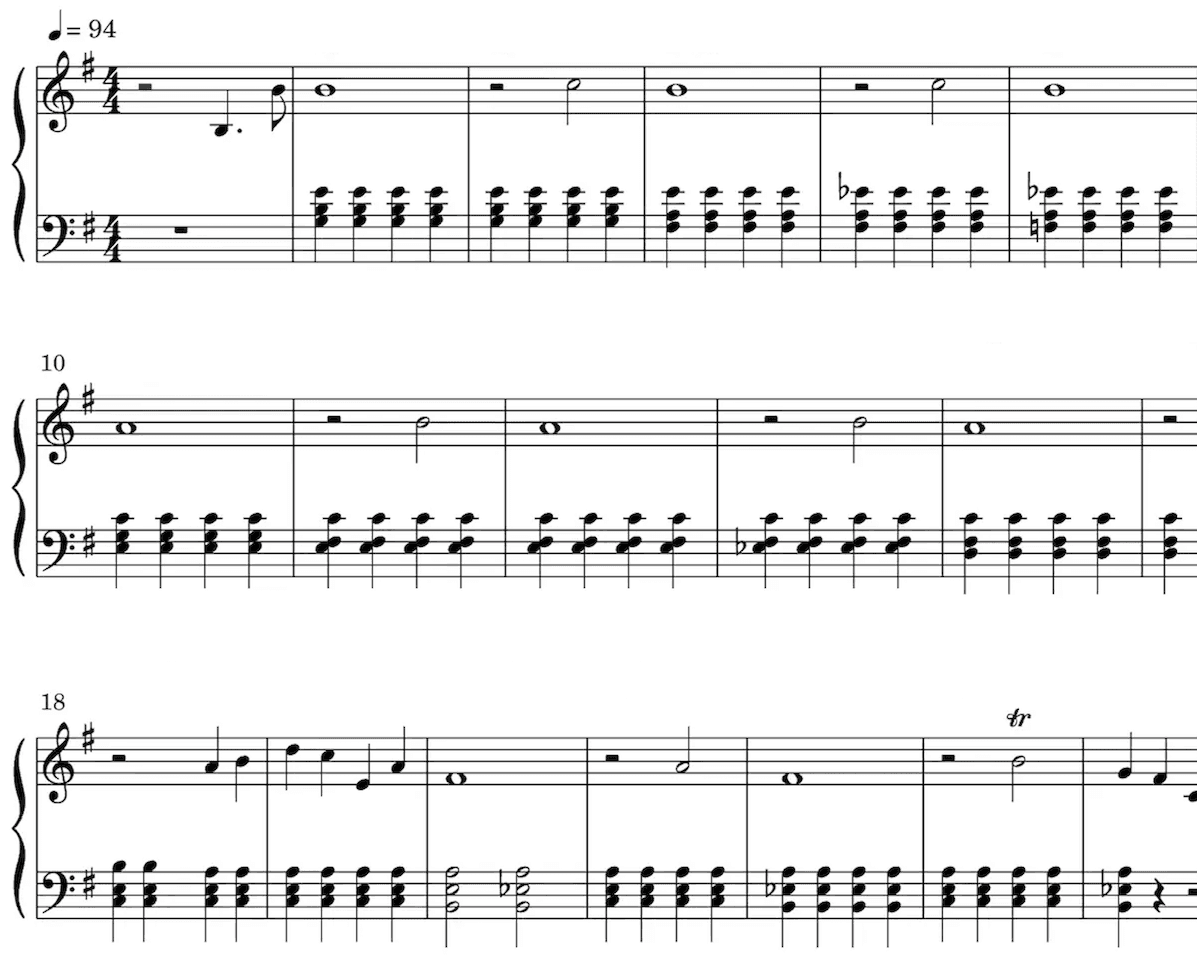
Partitura
Nuestra IA identifica las notas de tu grabación y las escribe en el pentagrama. También detecta automáticamente muchos otros elementos, como la indicación de compás y la armadura, o los trinos, el staccato y otras marcas de expresión.
La partitura es especialmente útil para quienes tienen formación clásica, para quienes estudian o enseñan música y para quienes componen.
Reproduce la partitura para escuchar la transcripción.
Sube o baja la velocidad a tu gusto.
Edita la partitura.
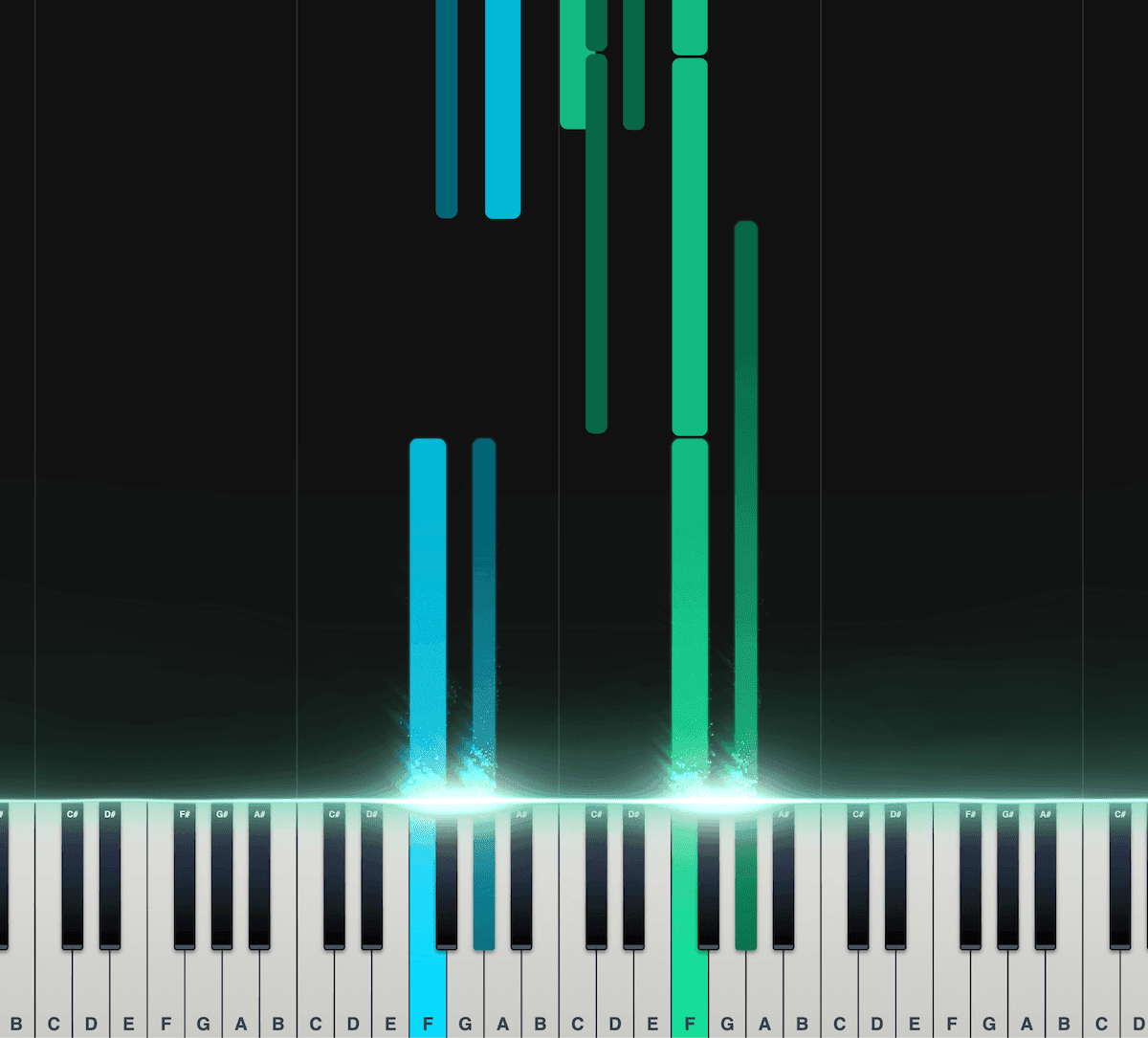
Piano roll
En el piano roll interactivo cada nota cae sobre el teclado del piano, así que ves exactamente qué se toca y en qué momento.
Ideal si no estás acostumbrado a leer otros tipos de notación, como la partitura.
Separa las notas de la mano izquierda y la derecha.
Ajusta la velocidad, la transposición, los colores y más.
Exporta un archivo MIDI para usarlo en tu DAW.
A músicos de todo el mundo les encanta Songscription
Únete a miles de músicos que cambiaron su manera de crear con Songscription
"Hay tantas canciones que he querido tocar y de las que nunca pude encontrar la partitura. Songscription por fin resuelve ese problema. Ahora solo tengo que pasarle el audio y ya puedo empezar a tocar."
Tomer
"Compuse una canción que llevo en el corazón desde hace años, una pieza muy personal que nunca había podido compartir como quería. Gracias a Songscription, por fin la convertí en una partitura. Ahora otras personas pueden interpretar y apreciar mi composición. Es un sueño que tengo desde que escribí esas notas."

Tony
"A lo largo de mi vida escribí tantas canciones que tengo en mis manos, pero que nunca pude transmitir a otras personas. Songscription me abrió una nueva puerta. Por primera vez, mi canción está guardada en una cápsula del tiempo para que cualquiera, en cualquier lugar, pueda tocarla ahora y dentro de muchos años."

"Compongo al piano y Songscription convierte mi desorden en una partitura de verdad."

Jeff
"Songscription me ayudó a transcribir mis propias grabaciones en vivo y me ahorró muchísimas horas en una tarea monótona que llevaba mucho tiempo."

Yameen Sekandari
Aparecimos en
Preguntas frecuentes
¿Tienes más preguntas? Escríbenos
Can Songscription add finger numbers to sheet music automatically?
Yes. Piano scores get finger numbers from 1 for the thumb to 5 for the pinky, generated automatically. They appear as labels on the piano roll and as numbers on the sheet music once you switch on Finger numbers.
Can I get piano fingering for a MIDI or MusicXML file?
Yes. Import the file and Songscription generates fingerings for it, just as it does for a song transcribed from audio. You then see them on the piano roll and, with the toggle on, on the sheet.
What do the finger numbers 1 to 5 mean?
They name the fingers. 1 is the thumb, 2 the index finger, 3 the middle finger, 4 the ring finger and 5 the pinky. The same numbering is used for the left hand and the right hand.
Does the fingering generator work for guitar or other instruments?
No. Finger numbers are generated for piano only. Guitar transcriptions come with tabs and notation instead, which show the string and fret for each note.
Is the fingering generator free to try?
Sí. Puedes transcribir clips de 30 segundos gratis y sin límite, y para los más largos hay una prueba gratuita. Los planes de pago dan más tiempo de transcripción y admiten archivos más largos.
How do I add finger numbers to a piano piece?
Bring the music into Songscription as a recording or as a MIDI or MusicXML file. Fingerings are generated for the piano part automatically, and the Finger numbers switch puts them on the score.
- Choose your source. Upload audio or video, paste a YouTube, TikTok or Instagram link, record in the browser, or import a MIDI or MusicXML file.
- Let it run as piano. This page is set to piano, so the result is a two-hand score with a finger worked out for every note.
- Switch on Finger numbers. New scores open with sheet fingerings hidden. Turn the toggle on and the numbers appear with the notes.
- Practice along with the roll. Open the piano roll to see the same finger labels on the falling notes while the song plays at the speed you set.
How do you read piano finger numbers?
Each number stands for one finger, and the scheme is identical in both hands: the thumb is always 1 and the pinky is always 5. Our explainer on piano finger numbers has more practice tips.
| Number | Finger | Worth knowing |
|---|---|---|
| 1 | Thumb | Often tucks under the hand to keep a scale going |
| 2 | Index finger | Strong and nimble, a natural leader for a line |
| 3 | Middle finger | The longest finger, a common crossing point over the thumb |
| 4 | Ring finger | Weaker in most hands, so it rewards slow, separate practice |
| 5 | Pinky | Often takes the top note in the right hand and the bass note in the left |
Where do the finger numbers show up?
In two places. On the piano roll every falling note carries a finger label, and on the sheet music the numbers sit with the notes once the Finger numbers toggle is on.
Seeing one fingering in both views helps when you are learning by eye and by ear together. The roll colors each hand differently, can hide one hand, slows playback down and shows note names, so you can drill the left hand alone with its fingering in view. The piano tutorial creator page covers the roll in more depth.
Which music can the fingering generator handle?
Any piano score in your account, whether it came from a recording or from a file you imported.
Songscription cannot read PDFs, photos or printed scores, so a paper copy has to become a MIDI or MusicXML file before it can get fingerings.
- Songs transcribed from audio or video with piano transcription
- MIDI files from a DAW or a download, brought in the same way as on MIDI to sheet music
- MusicXML files exported from notation software
- Piano covers of songs that have no piano in the original
What if a suggested fingering doesn't suit my hand?
Use what works for you, and let us know. Hands come in different sizes, so a suggested fingering will not fit everyone, and you can report wrong finger numbers straight from the score.
Those reports go to the team improving the fingering model. Teachers often treat the generated numbers as a first draft to talk through with a student, adjusting a finger or two where a hand is small or a stretch is wide.