Recursos
Say It in Plain Words
Write the change the way you would say it to a friend at the piano, like fixing a wrong note or adding lyrics, and Annie edits the score. No menus to hunt through.
You Stay in Charge
Every change lands on the page where you can see it and play it back. If it isn't what you meant, undo it and ask again with different wording.
Manual Tools Right Beside Her
The regular editor is always there: fix pitches, move or delete notes, reassign notes between hands, adjust timing, add lyrics, transpose, and re-export whenever you like.
Exemplos de transcrição
Clique em uma música para ver o Songscription em ação.
The Score Annie Works On
Partitura
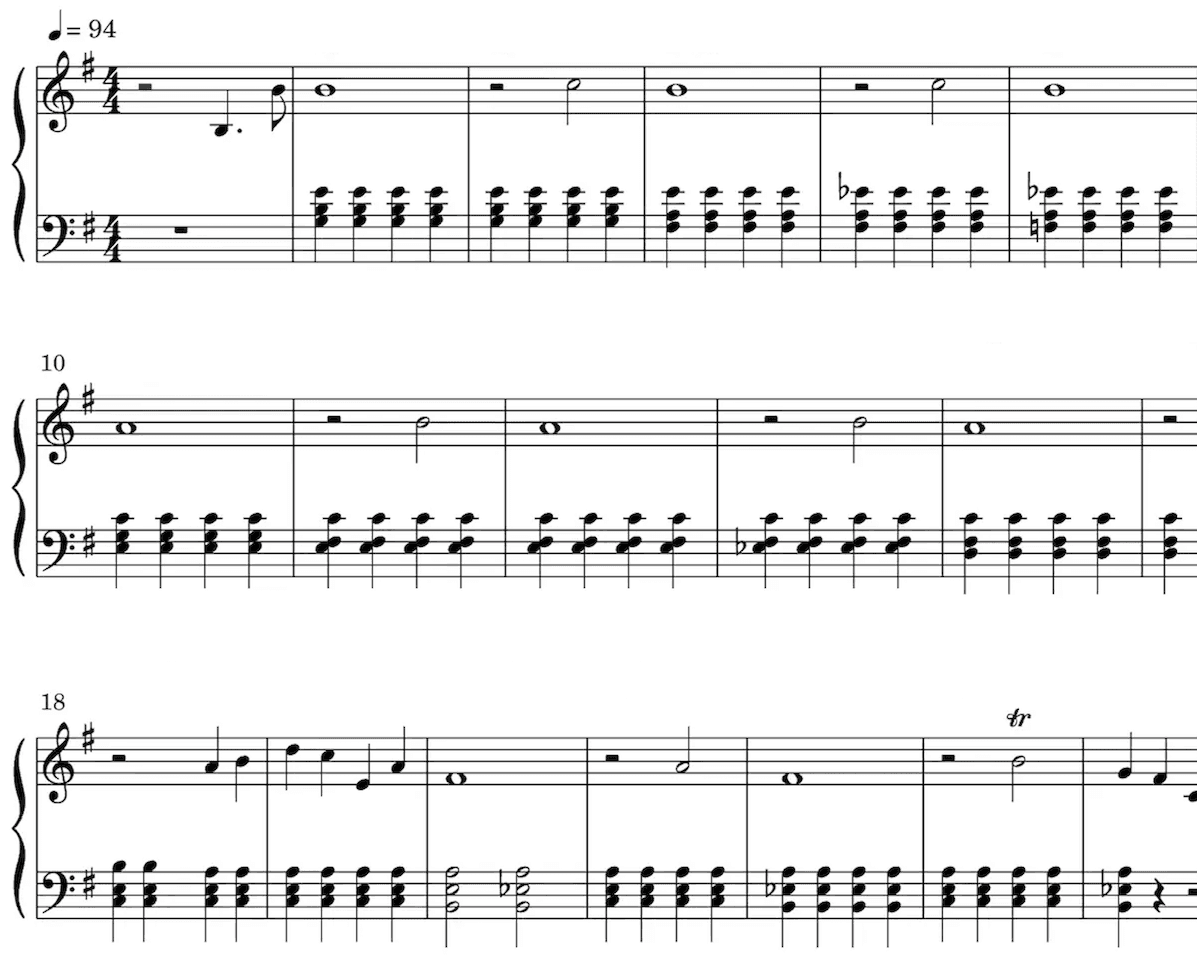
Nossa IA identifica as notas do seu áudio e escreve tudo na pauta. Ela detecta sozinha vários elementos da música, como fórmula de compasso, armadura de clave, trinados e staccato.
A partitura é especialmente útil para quem tem formação clássica, estuda música, dá aula ou compõe.
Reproduza a partitura para ouvir a transcrição.
Deixe a reprodução mais rápida ou mais lenta, do jeito que preferir.
Edite a transcrição.
Adorado por quem faz música no mundo todo
Junte-se a milhares de pessoas que já mudaram o jeito de criar música com o Songscription
"Tem tantas músicas que eu sempre quis tocar, mas nunca achava a partitura. O Songscription finalmente resolve esse problema. Agora é só passar o áudio por ele e começar a tocar."
Tomer
"Compus uma música que vive no meu coração há anos, uma peça muito pessoal que eu nunca consegui compartilhar direito. Graças ao Songscription, finalmente consegui passá-la para partitura. Agora minha composição pode ser tocada e apreciada não só por mim. É um sonho que tenho desde que escrevi aquelas notas pela primeira vez."

Tony
"Tem tantas músicas que escrevi ao longo da vida e que guardo nas mãos, mas nunca consegui passar adiante. O Songscription abriu uma porta nova. Pela primeira vez, tenho uma cápsula do tempo duradoura da minha música, que qualquer pessoa, em qualquer lugar, pode tocar, hoje e por muito tempo ainda."

"Eu crio no piano, e o Songscription organiza minha bagunça e transforma tudo em partitura de verdade."

Jeff

"O Songscription me ajudou a transcrever minhas próprias gravações ao vivo e transformou uma tarefa maçante e demorada em algo que já me poupou horas e horas."

Yameen Sekandari
Na imprensa
Perguntas frequentes
Ainda tem dúvidas? Fale com a gente
What is an AI sheet music editor?
It is a notation editor where you describe a change in words and an assistant applies it to the score. In Songscription that assistant is Annie. She works inside the same editor where you can also change notes by hand, and you can undo any edit she makes.
Is Annie available on a free account?
Yes. Annie is available to every signed-in Songscription account, free accounts included. Create an account, open any transcription in the editor, and the assistant is there.
Can Annie write music for me?
No. Annie is an editing assistant, not a composer. She changes a score you already have, for example fixing a wrong note, moving a passage or adding lyrics. Always look over her edits before you export.
Which scores can I edit with Annie?
Any score in your Songscription account: a transcription of an uploaded audio or video file, a YouTube, TikTok or Instagram link, or a browser recording, plus MIDI and MusicXML files you import. Songscription cannot read PDFs, photos or paper scores.
Can I try the editor for free?
Sim. Você pode transcrever quantos trechos de 30 segundos quiser de graça, e há um teste gratuito para arquivos mais longos. Os planos pagos dão mais tempo de transcrição e aceitam arquivos mais longos.
How does editing sheet music with AI work?
You type the change you want and Annie makes it on the score. Then you look at it, listen to it, and keep it or undo it. It feels more like asking a helper than digging through toolbars.
- Get a score into the editor. Transcribe a recording, paste a link, or import a MIDI or MusicXML file. Every result opens in the editor.
- Describe the change. Open Annie and write what you want in ordinary words, such as asking her to correct a note that sounds off or to put lyrics under the melody.
- Check it, then carry on. Read the edit on the page and play it back. If it missed, undo it and rephrase, or switch to the manual tools for fine detail.
- Export when it reads right. Download a PDF, MIDI or MusicXML file, or come back later and export again after more changes.
What kinds of changes can I ask Annie for?
Small, specific requests work best. Annie is built for everyday cleanup on a score you already have, and she makes each edit directly on the notation so you can judge it straight away.
Think of her as a helpful assistant rather than an arranger. If a request is broad, split it into smaller ones and check each result. Our article on whether AI can edit sheet music sets out what to expect.
- Fix a note that came out at the wrong pitch
- Move a passage to where it belongs
- Add lyrics under a melody line
- Step back through the undo history whenever an edit is not what you wanted
When should I ask Annie and when should I edit by hand?
Ask Annie when saying the change is quicker than clicking it, and use the manual tools when you want exact control over one note. Most people mix both in the same session.
| Task | With Annie | By hand |
|---|---|---|
| One note at the wrong pitch | Describe the note and the fix you want | Select the note and change its pitch |
| Lyrics under the melody | Ask her to add the lyrics | Type the words in yourself |
| A passage in the wrong place | Say where it should go | Select the notes and move them |
| A note in the wrong hand | Usually quicker by hand | Reassign it between left and right hand |
| The whole song in a new key | Usually quicker by hand | Transpose the score in one step |
Why would a transcription need editing at all?
Because no transcription is perfect. A crowded mix, a fast run or a long sustained chord can leave a note or two that doesn't match what you hear, and fixing those quickly is what turns a draft into a chart you trust.
Our guide to fixing AI transcription errors lists the usual suspects, and editing sheet music after you make it walks through the manual tools step by step. Starting from an idea rather than a recording? The sheet music maker is the place to begin.
Do my edits carry over when I export?
Yes. Edits from Annie and from the manual tools become part of the score, so the PDF, the score MIDI and the MusicXML file you download all include them.
The one exception is the raw transcription MIDI. It keeps the original unquantized performance with its free timing and velocities, so score edits are not applied to it. Pick the score MIDI when you want your corrections in the file.