Recursos
A Track per Instrument
Drums, bass, guitars, keys, synths, strings, brass and winds land on separate MIDI tracks, ready to route to whatever instruments, samplers and kits you load in your session.
Raw or Score-Based MIDI
Take the unquantized transcription MIDI to keep the original feel and velocities, or the score-derived MIDI that matches your edited notation.
Keys Split by Hand
The keyboard part comes divided into left and right hand, so the bass notes and the chords are easy to tell apart when you start editing.
Exemplos de transcrição
Clique em uma música para ver o Songscription em ação.
Every Track Laid Out as Notes
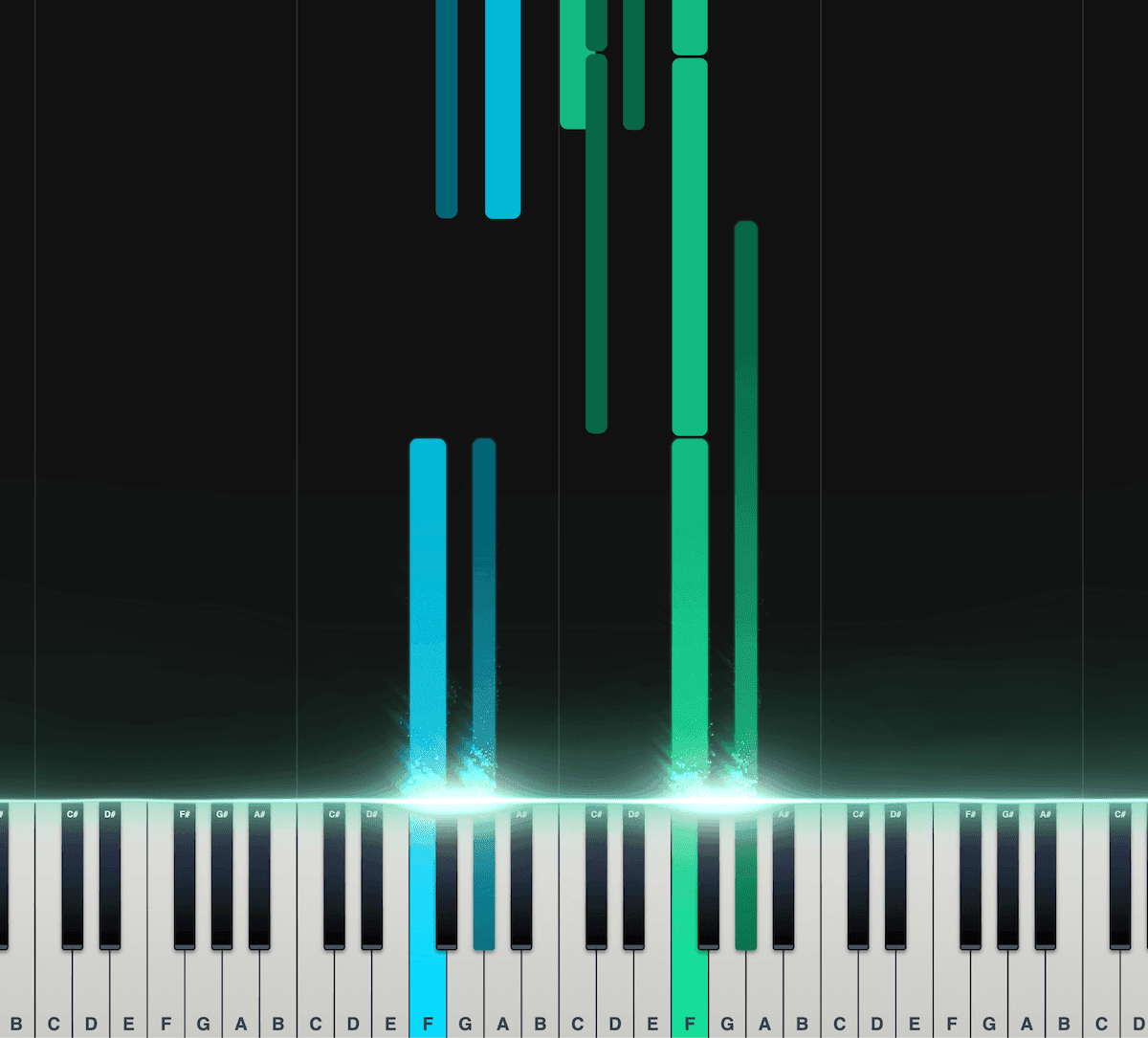
Piano roll
No nosso piano roll interativo, cada nota cai sobre o teclado na hora em que soa. Você vê exatamente o que está sendo tocado e quando.
Bom para quem ainda não tem muita prática em ler partitura ou outras formas de notação.
Separe as notas entre mão esquerda e mão direita.
Ajuste a velocidade, a transposição, as cores e outras opções.
Exporte como arquivo MIDI para usar na sua DAW.
Adorado por quem faz música no mundo todo
Junte-se a milhares de pessoas que já mudaram o jeito de criar música com o Songscription
"Tem tantas músicas que eu sempre quis tocar, mas nunca achava a partitura. O Songscription finalmente resolve esse problema. Agora é só passar o áudio por ele e começar a tocar."
Tomer
"Compus uma música que vive no meu coração há anos, uma peça muito pessoal que eu nunca consegui compartilhar direito. Graças ao Songscription, finalmente consegui passá-la para partitura. Agora minha composição pode ser tocada e apreciada não só por mim. É um sonho que tenho desde que escrevi aquelas notas pela primeira vez."

Tony
"Tem tantas músicas que escrevi ao longo da vida e que guardo nas mãos, mas nunca consegui passar adiante. O Songscription abriu uma porta nova. Pela primeira vez, tenho uma cápsula do tempo duradoura da minha música, que qualquer pessoa, em qualquer lugar, pode tocar, hoje e por muito tempo ainda."

"Eu crio no piano, e o Songscription organiza minha bagunça e transforma tudo em partitura de verdade."

Jeff

"O Songscription me ajudou a transcrever minhas próprias gravações ao vivo e transformou uma tarefa maçante e demorada em algo que já me poupou horas e horas."

Yameen Sekandari
Na imprensa
Perguntas frequentes
Ainda tem dúvidas? Fale com a gente
Can I try multitrack MIDI conversion for free?
Sim. Você pode transcrever quantos trechos de 30 segundos quiser de graça, e há um teste gratuito para arquivos mais longos. Os planos pagos dão mais tempo de transcrição e aceitam arquivos mais longos.
Which DAWs can open the multitrack MIDI file?
Any DAW that imports standard MIDI files, including Ableton Live, Logic Pro, FL Studio and GarageBand. Each instrument arrives as its own track, so you can load a different sound on each one.
Is the MIDI quantized?
The raw transcription MIDI is not. It keeps the free timing and velocities of the performance, so you can quantize it in your DAW as tightly or loosely as you like. The score-derived MIDI follows the written score instead, including any edits you made.
How cleanly does it separate the instruments?
Multi-Instrument is still in beta and improving. On busy mixes a note can end up on the wrong track or go missing. Check each track, fix notes in the editor before you export, or run one instrument on its own when that part has to be as clean as possible.
Does this export audio stems?
No. You get MIDI notes and sheet music, not separated audio. MIDI lets you play each part through your own instruments and change any note, which is usually what you want for remakes and remixes.
Can I convert a whole song to multitrack MIDI?
Yes. Multi-Instrument (beta) listens to a mixed recording in a single pass and writes a MIDI file with one track for each instrument it hears, across keys, guitars, bass, strings, brass, woodwinds, saxophones, synths, voice and drums. Dense orchestral mixes are the hardest case, so expect more cleanup there.
That is different from a regular audio-to-MIDI conversion, which hands you one instrument's notes. Here the whole arrangement comes across at once, with each player's notes kept apart so you can mute, reassign or rewrite them separately. If you only need one part, the audio to MIDI converter isolates a single instrument instead.
How do I get a song into my DAW as multitrack MIDI?
Upload the song here, download the MIDI when the transcription is done, and import the file into your DAW. Most DAWs open a multitrack MIDI file as a set of separate tracks without any extra setup.
- Upload the mix. Use an MP3, WAV, FLAC, AAC or M4A file, a video, or a YouTube, TikTok or Instagram link. This page is already set to Multi-Instrument.
- Download the MIDI. Choose the raw transcription MIDI or the score-derived MIDI from the Download menu.
- Import into your session. Drag the file into Ableton Live, Logic Pro, FL Studio or GarageBand. Our guide on how to import MIDI into a DAW covers each one.
- Assign your own sounds. Put a drum rack on the drum track, a bass synth on the bass, a favorite keys patch on the keyboard part, a string library on the strings, and carry on from there.
Which MIDI file should I download: raw or score-derived?
Download the raw MIDI when you want the performance as it was played, and the score-derived MIDI when you want the notes to match the cleaned-up notation.
Edits you make to the score do not carry into the raw file, so fix notes first if you plan to use the score-derived version. Raw MIDI does not snap to a grid; apply quantize in your DAW at whatever strength suits each track, lighter on the drums if you want to keep the swing.
| MIDI file | Timing | Best for |
|---|---|---|
| Raw transcription MIDI | Free time and unquantized, with the velocities of the original performance | Keeping the human feel, then quantizing in your DAW on your own terms |
| Score-derived MIDI | Follows the written score, including any corrections you made | Notes that line up with the sheet music after you fix them in the editor |
Why use multitrack MIDI instead of audio stems?
MIDI gives you the notes rather than the sound, so every part can be played through any instrument you choose, transposed, or rewritten note by note. Stems keep the original recording's tone but lock you into it. Songscription does not export audio stems; it gives you the notes.
That makes multitrack MIDI the better starting point for remakes, remixes with new sounds, and studying how a producer built each part. We compare the two in multitrack MIDI vs stems, and recreate a song in your DAW walks through a full rebuild.
- Swap the original sounds for your own synths, samplers and drum kits
- Change key or tempo with no audio artifacts to worry about
- Rewrite a single part, such as a new bass line, while the rest of the arrangement stays put
- Open each part in your DAW's piano roll to study the voicings and rhythms