Recursos
Numbers in Both Views
Each note gets a finger label on the falling-note piano roll and a matching number on the sheet music, so the hand shape you watch is the hand shape you read.
Works on Files You Already Own
Import a MIDI or MusicXML file and fingerings are generated for it too. Useful for pieces exported from a DAW, downloaded, or written in notation software.
Show Them or Hide Them
A Finger numbers switch puts them on the score or clears them away. New scores open with sheet fingerings hidden, so flip it on when you want guidance.
Exemplos de transcrição
Clique em uma música para ver o Songscription em ação.
Finger Numbers on the Page and the Roll
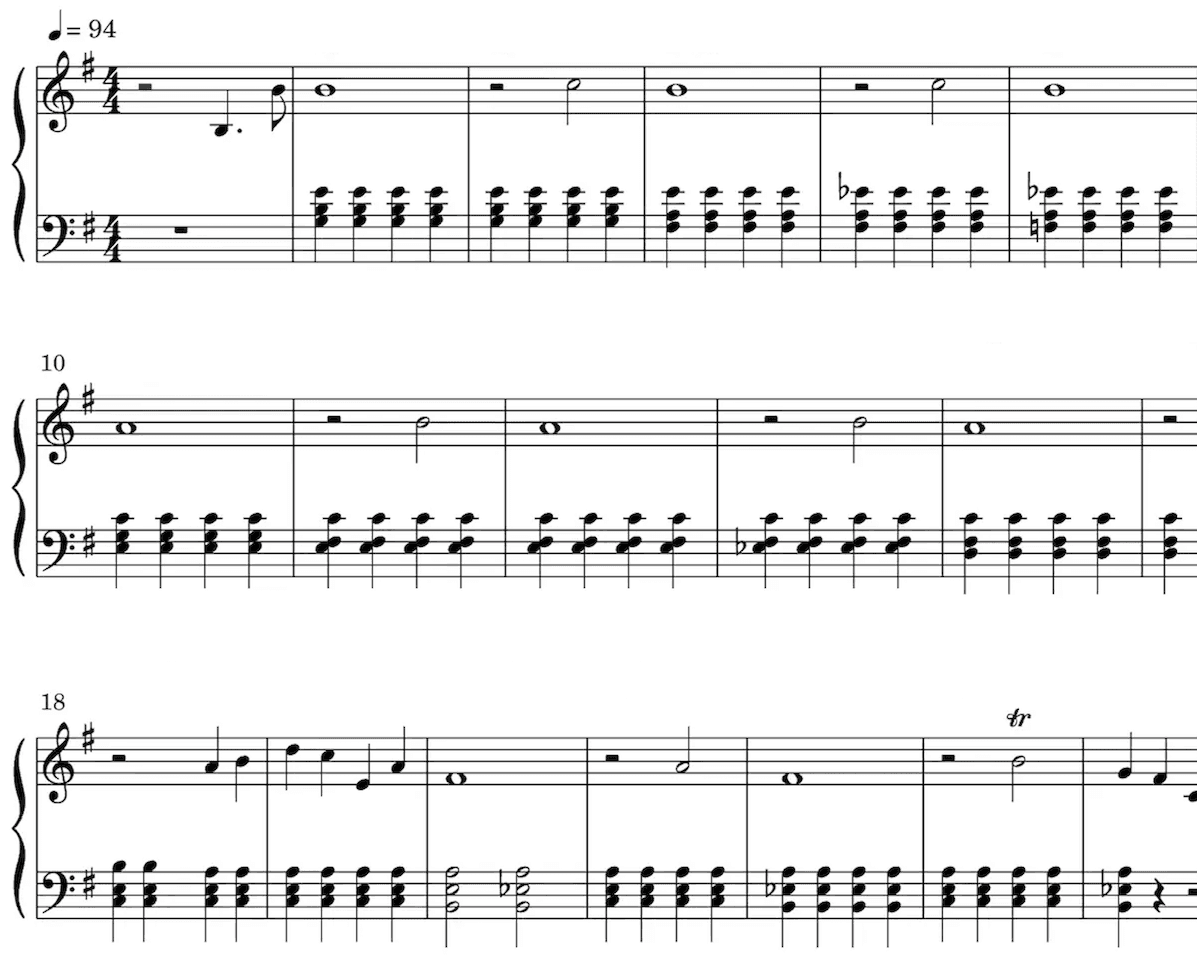
Partitura
Nossa IA identifica as notas do seu áudio e escreve tudo na pauta. Ela detecta sozinha vários elementos da música, como fórmula de compasso, armadura de clave, trinados e staccato.
A partitura é especialmente útil para quem tem formação clássica, estuda música, dá aula ou compõe.
Reproduza a partitura para ouvir a transcrição.
Deixe a reprodução mais rápida ou mais lenta, do jeito que preferir.
Edite a transcrição.
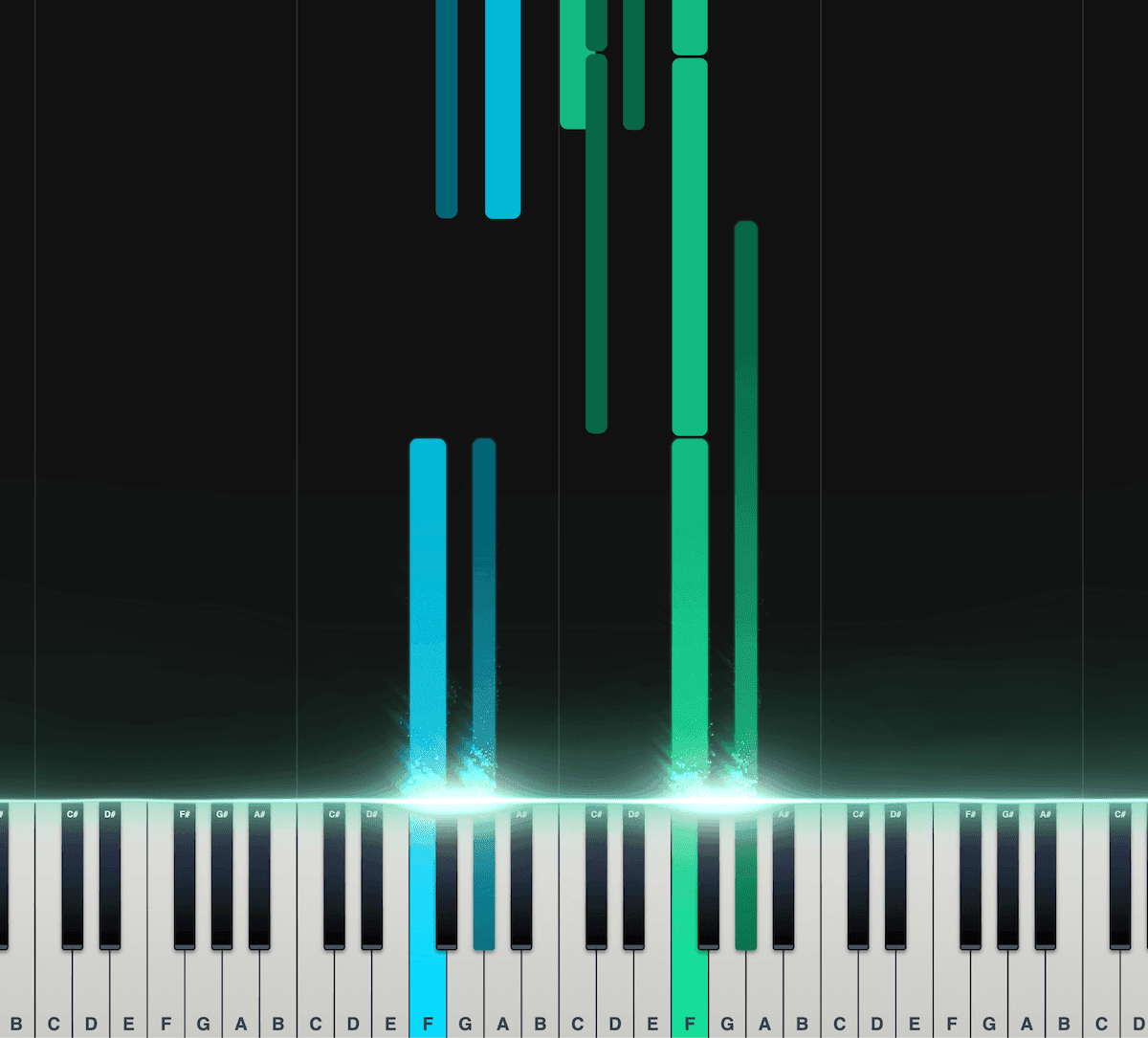
Piano roll
No nosso piano roll interativo, cada nota cai sobre o teclado na hora em que soa. Você vê exatamente o que está sendo tocado e quando.
Bom para quem ainda não tem muita prática em ler partitura ou outras formas de notação.
Separe as notas entre mão esquerda e mão direita.
Ajuste a velocidade, a transposição, as cores e outras opções.
Exporte como arquivo MIDI para usar na sua DAW.
Adorado por quem faz música no mundo todo
Junte-se a milhares de pessoas que já mudaram o jeito de criar música com o Songscription
"Tem tantas músicas que eu sempre quis tocar, mas nunca achava a partitura. O Songscription finalmente resolve esse problema. Agora é só passar o áudio por ele e começar a tocar."
Tomer
"Compus uma música que vive no meu coração há anos, uma peça muito pessoal que eu nunca consegui compartilhar direito. Graças ao Songscription, finalmente consegui passá-la para partitura. Agora minha composição pode ser tocada e apreciada não só por mim. É um sonho que tenho desde que escrevi aquelas notas pela primeira vez."

Tony
"Tem tantas músicas que escrevi ao longo da vida e que guardo nas mãos, mas nunca consegui passar adiante. O Songscription abriu uma porta nova. Pela primeira vez, tenho uma cápsula do tempo duradoura da minha música, que qualquer pessoa, em qualquer lugar, pode tocar, hoje e por muito tempo ainda."

"Eu crio no piano, e o Songscription organiza minha bagunça e transforma tudo em partitura de verdade."

Jeff
"O Songscription me ajudou a transcrever minhas próprias gravações ao vivo e transformou uma tarefa maçante e demorada em algo que já me poupou horas e horas."

Yameen Sekandari
Na imprensa
Perguntas frequentes
Ainda tem dúvidas? Fale com a gente
Can Songscription add finger numbers to sheet music automatically?
Yes. Piano scores get finger numbers from 1 for the thumb to 5 for the pinky, generated automatically. They appear as labels on the piano roll and as numbers on the sheet music once you switch on Finger numbers.
Can I get piano fingering for a MIDI or MusicXML file?
Yes. Import the file and Songscription generates fingerings for it, just as it does for a song transcribed from audio. You then see them on the piano roll and, with the toggle on, on the sheet.
What do the finger numbers 1 to 5 mean?
They name the fingers. 1 is the thumb, 2 the index finger, 3 the middle finger, 4 the ring finger and 5 the pinky. The same numbering is used for the left hand and the right hand.
Does the fingering generator work for guitar or other instruments?
No. Finger numbers are generated for piano only. Guitar transcriptions come with tabs and notation instead, which show the string and fret for each note.
Is the fingering generator free to try?
Sim. Você pode transcrever quantos trechos de 30 segundos quiser de graça, e há um teste gratuito para arquivos mais longos. Os planos pagos dão mais tempo de transcrição e aceitam arquivos mais longos.
How do I add finger numbers to a piano piece?
Bring the music into Songscription as a recording or as a MIDI or MusicXML file. Fingerings are generated for the piano part automatically, and the Finger numbers switch puts them on the score.
- Choose your source. Upload audio or video, paste a YouTube, TikTok or Instagram link, record in the browser, or import a MIDI or MusicXML file.
- Let it run as piano. This page is set to piano, so the result is a two-hand score with a finger worked out for every note.
- Switch on Finger numbers. New scores open with sheet fingerings hidden. Turn the toggle on and the numbers appear with the notes.
- Practice along with the roll. Open the piano roll to see the same finger labels on the falling notes while the song plays at the speed you set.
How do you read piano finger numbers?
Each number stands for one finger, and the scheme is identical in both hands: the thumb is always 1 and the pinky is always 5. Our explainer on piano finger numbers has more practice tips.
| Number | Finger | Worth knowing |
|---|---|---|
| 1 | Thumb | Often tucks under the hand to keep a scale going |
| 2 | Index finger | Strong and nimble, a natural leader for a line |
| 3 | Middle finger | The longest finger, a common crossing point over the thumb |
| 4 | Ring finger | Weaker in most hands, so it rewards slow, separate practice |
| 5 | Pinky | Often takes the top note in the right hand and the bass note in the left |
Where do the finger numbers show up?
In two places. On the piano roll every falling note carries a finger label, and on the sheet music the numbers sit with the notes once the Finger numbers toggle is on.
Seeing one fingering in both views helps when you are learning by eye and by ear together. The roll colors each hand differently, can hide one hand, slows playback down and shows note names, so you can drill the left hand alone with its fingering in view. The piano tutorial creator page covers the roll in more depth.
Which music can the fingering generator handle?
Any piano score in your account, whether it came from a recording or from a file you imported.
Songscription cannot read PDFs, photos or printed scores, so a paper copy has to become a MIDI or MusicXML file before it can get fingerings.
- Songs transcribed from audio or video with piano transcription
- MIDI files from a DAW or a download, brought in the same way as on MIDI to sheet music
- MusicXML files exported from notation software
- Piano covers of songs that have no piano in the original
What if a suggested fingering doesn't suit my hand?
Use what works for you, and let us know. Hands come in different sizes, so a suggested fingering will not fit everyone, and you can report wrong finger numbers straight from the score.
Those reports go to the team improving the fingering model. Teachers often treat the generated numbers as a first draft to talk through with a student, adjusting a finger or two where a hand is small or a stretch is wide.