功能
Say It in Plain Words
Write the change the way you would say it to a friend at the piano, like fixing a wrong note or adding lyrics, and Annie edits the score. No menus to hunt through.
You Stay in Charge
Every change lands on the page where you can see it and play it back. If it isn't what you meant, undo it and ask again with different wording.
Manual Tools Right Beside Her
The regular editor is always there: fix pitches, move or delete notes, reassign notes between hands, adjust timing, add lyrics, transpose, and re-export whenever you like.
扒谱示例
点击卡片,看看 Songscription 实际扒出来的效果。
The Score Annie Works On
五线谱
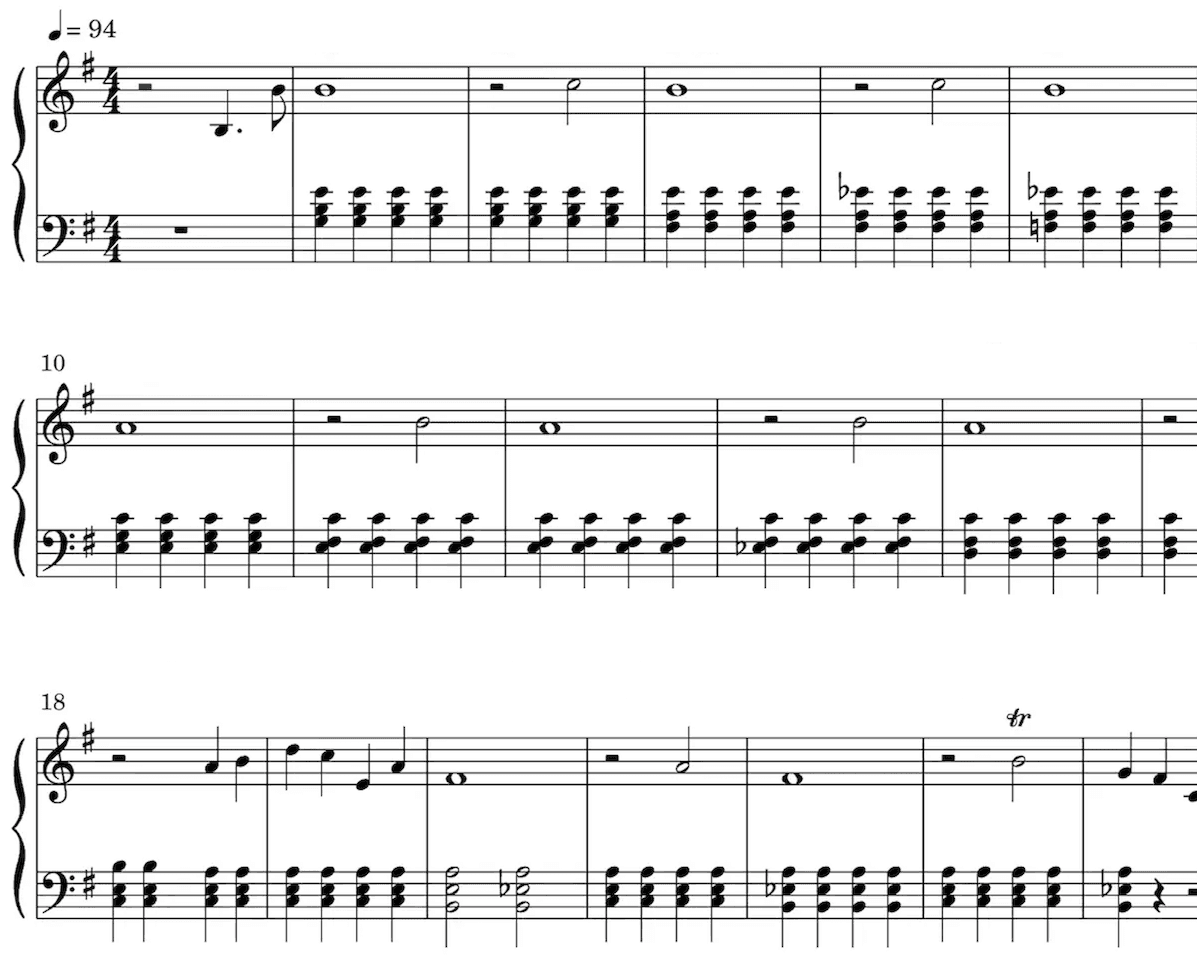
我们的 AI 会从你的音频里找出每个音,把它们记到五线谱上。拍号、调号、颤音、跳音和其他表情记号,也会自动识别出来。
学古典出身的乐手、学音乐的学生、音乐老师和作曲的人,用五线谱会特别顺手。
播放乐谱,听听扒出来的效果。
播放速度随你调快或调慢。
直接修改扒好的谱子。
世界各地的乐手都爱用
已有数千名乐手用 Songscription 改变了自己的创作方式
"有好多歌我一直想弹,却怎么也找不到乐谱。Songscription 终于解决了这个问题,现在我只要把音频交给它处理,就能开始弹了。"
Tomer
"我写过一首歌,多年来一直放在心里。它对我有很深的个人意义,但我始终没能好好把它分享出去。多亏 Songscription,我终于把它变成了乐谱。现在,除了我自己弹,其他人也能演奏、欣赏这首作品了。从写下那些音符开始,这就是我一直以来的梦想。"

Tony

"我用钢琴创作,Songscription 会把我那些乱七八糟的东西整理成真正的乐谱。"

Jeff

"Songscription 帮我把自己的现场录音转成乐谱。这活儿本来又枯燥又费时间,它给我省下了不知道多少个小时。"

Yameen Sekandari
媒体报道
常见问题
还有别的问题?联系我们
What is an AI sheet music editor?
It is a notation editor where you describe a change in words and an assistant applies it to the score. In Songscription that assistant is Annie. She works inside the same editor where you can also change notes by hand, and you can undo any edit she makes.
Is Annie available on a free account?
Yes. Annie is available to every signed-in Songscription account, free accounts included. Create an account, open any transcription in the editor, and the assistant is there.
Can Annie write music for me?
No. Annie is an editing assistant, not a composer. She changes a score you already have, for example fixing a wrong note, moving a passage or adding lyrics. Always look over her edits before you export.
Which scores can I edit with Annie?
Any score in your Songscription account: a transcription of an uploaded audio or video file, a YouTube, TikTok or Instagram link, or a browser recording, plus MIDI and MusicXML files you import. Songscription cannot read PDFs, photos or paper scores.
Can I try the editor for free?
可以免费用。30 秒的片段随便转,次数不限;更长的文件可以先免费试用。付费套餐的转录时长更多,也能处理更长的文件。
How does editing sheet music with AI work?
You type the change you want and Annie makes it on the score. Then you look at it, listen to it, and keep it or undo it. It feels more like asking a helper than digging through toolbars.
- Get a score into the editor. Transcribe a recording, paste a link, or import a MIDI or MusicXML file. Every result opens in the editor.
- Describe the change. Open Annie and write what you want in ordinary words, such as asking her to correct a note that sounds off or to put lyrics under the melody.
- Check it, then carry on. Read the edit on the page and play it back. If it missed, undo it and rephrase, or switch to the manual tools for fine detail.
- Export when it reads right. Download a PDF, MIDI or MusicXML file, or come back later and export again after more changes.
What kinds of changes can I ask Annie for?
Small, specific requests work best. Annie is built for everyday cleanup on a score you already have, and she makes each edit directly on the notation so you can judge it straight away.
Think of her as a helpful assistant rather than an arranger. If a request is broad, split it into smaller ones and check each result. Our article on whether AI can edit sheet music sets out what to expect.
- Fix a note that came out at the wrong pitch
- Move a passage to where it belongs
- Add lyrics under a melody line
- Step back through the undo history whenever an edit is not what you wanted
When should I ask Annie and when should I edit by hand?
Ask Annie when saying the change is quicker than clicking it, and use the manual tools when you want exact control over one note. Most people mix both in the same session.
| Task | With Annie | By hand |
|---|---|---|
| One note at the wrong pitch | Describe the note and the fix you want | Select the note and change its pitch |
| Lyrics under the melody | Ask her to add the lyrics | Type the words in yourself |
| A passage in the wrong place | Say where it should go | Select the notes and move them |
| A note in the wrong hand | Usually quicker by hand | Reassign it between left and right hand |
| The whole song in a new key | Usually quicker by hand | Transpose the score in one step |
Why would a transcription need editing at all?
Because no transcription is perfect. A crowded mix, a fast run or a long sustained chord can leave a note or two that doesn't match what you hear, and fixing those quickly is what turns a draft into a chart you trust.
Our guide to fixing AI transcription errors lists the usual suspects, and editing sheet music after you make it walks through the manual tools step by step. Starting from an idea rather than a recording? The sheet music maker is the place to begin.
Do my edits carry over when I export?
Yes. Edits from Annie and from the manual tools become part of the score, so the PDF, the score MIDI and the MusicXML file you download all include them.
The one exception is the raw transcription MIDI. It keeps the original unquantized performance with its free timing and velocities, so score edits are not applied to it. Pick the score MIDI when you want your corrections in the file.