Funktionen
Say It in Plain Words
Write the change the way you would say it to a friend at the piano, like fixing a wrong note or adding lyrics, and Annie edits the score. No menus to hunt through.
You Stay in Charge
Every change lands on the page where you can see it and play it back. If it isn't what you meant, undo it and ask again with different wording.
Manual Tools Right Beside Her
The regular editor is always there: fix pitches, move or delete notes, reassign notes between hands, adjust timing, add lyrics, transpose, and re-export whenever you like.
Beispieltranskriptionen
Klick auf eine Karte, dann siehst du, was Songscription aus dem Stück macht.
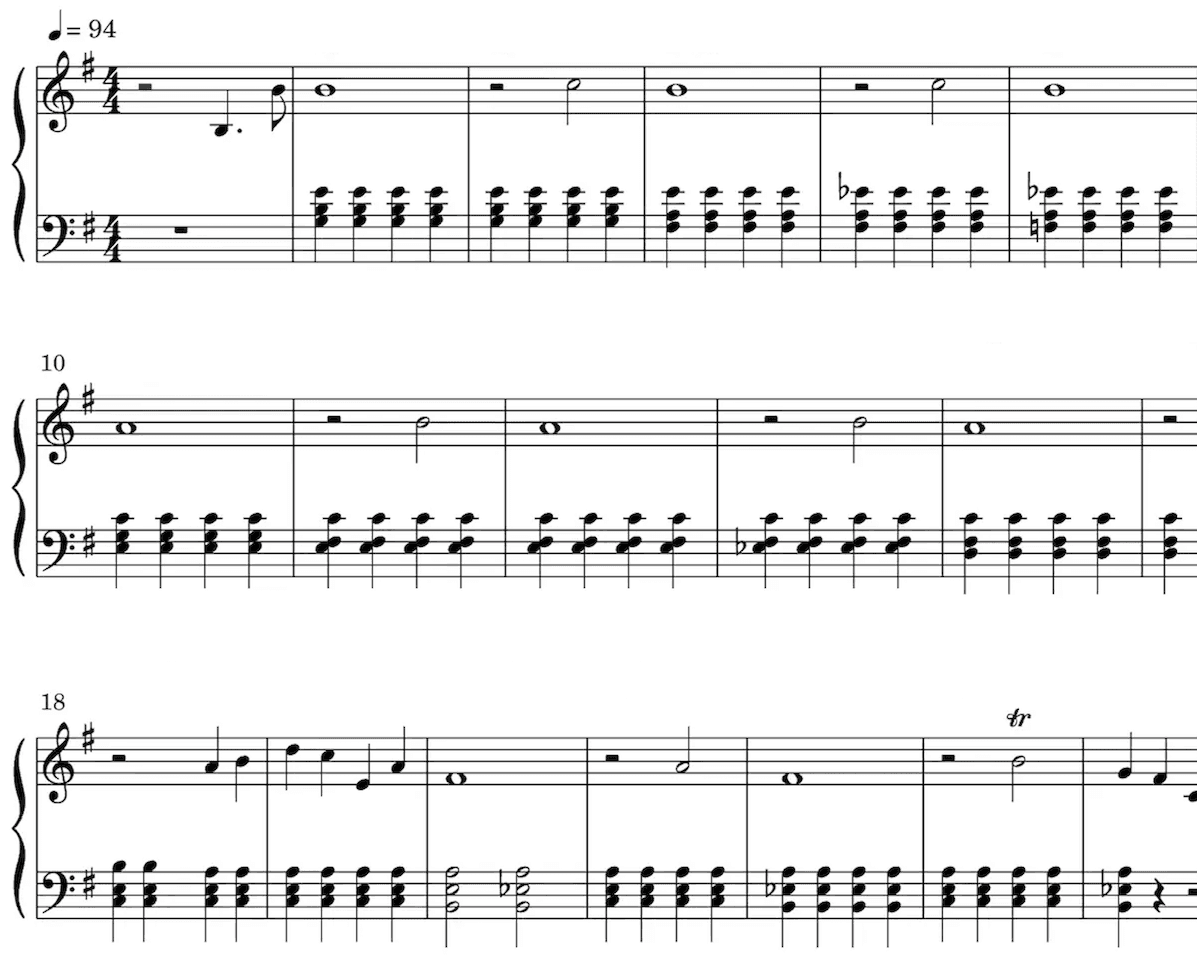
The Score Annie Works On
Noten
Unsere KI hört die Töne aus deiner Aufnahme heraus und schreibt sie als Noten auf. Taktart und Tonart erkennt sie dabei automatisch, ebenso Triller, Staccato und viele andere Vortragszeichen.
Besonders nützlich sind Noten, wenn du klassisch ausgebildet bist, Musik lernst, unterrichtest oder selbst komponierst.
Spiel deine Noten ab und hör dir die Transkription an.
Mach die Wiedergabe so schnell oder langsam, wie du willst.
Bearbeite die Transkription.
Beliebt bei Musiker:innen auf der ganzen Welt
Schließ dich Tausenden von Musiker:innen an, die mit Songscription anders an ihrer Musik arbeiten
"Es gibt so viele Songs, die ich spielen wollte, für die ich aber nie Noten finden konnte. Songscription löst dieses Problem endlich. Jetzt kann ich einfach die Aufnahme verarbeiten lassen und losspielen."
Tomer
"Ich habe einen Song komponiert, der mir seit Jahren am Herzen liegt. Es ist ein sehr persönliches Stück, das ich bisher nie richtig teilen konnte. Dank Songscription habe ich es endlich in Noten festgehalten. Jetzt können auch andere meine Komposition spielen und schätzen. Davon träume ich, seit ich diese Noten zum ersten Mal aufgeschrieben habe."

Tony
"Ich habe in meinem Leben so viele Songs geschrieben, die ich in meinen Händen halte, aber nie weitergeben konnte. Songscription hat mir eine neue Tür geöffnet. Zum ersten Mal habe ich eine bleibende Zeitkapsel meines Songs, den alle überall spielen können, heute und auch noch in ferner Zukunft."

"Ich komponiere am Klavier, und Songscription macht aus meinem Durcheinander richtige Noten."

Jeff
"Ein sehr genaues Tool, das viel Zeit spart. Ich lerne Jazzklavier und hätte ehrlich gesagt nicht erwartet, dass irgendeine Transkriptions-KI mit dem Stück, das ich ihr gegeben habe, gut zurechtkommt, weil es so schwierig und schnell ist. Aber die KI von Songscription hat mich eines Besseren belehrt."

"Songscription hat mir geholfen, meine eigenen Liveaufnahmen zu transkribieren, und mir bei dieser sonst eintönigen und zeitaufwendigen Aufgabe unzählige Stunden gespart."

Yameen Sekandari
Bekannt aus
Häufige Fragen
Noch Fragen? Schreib uns
What is an AI sheet music editor?
It is a notation editor where you describe a change in words and an assistant applies it to the score. In Songscription that assistant is Annie. She works inside the same editor where you can also change notes by hand, and you can undo any edit she makes.
Is Annie available on a free account?
Yes. Annie is available to every signed-in Songscription account, free accounts included. Create an account, open any transcription in the editor, and the assistant is there.
Can Annie write music for me?
No. Annie is an editing assistant, not a composer. She changes a score you already have, for example fixing a wrong note, moving a passage or adding lyrics. Always look over her edits before you export.
Which scores can I edit with Annie?
Any score in your Songscription account: a transcription of an uploaded audio or video file, a YouTube, TikTok or Instagram link, or a browser recording, plus MIDI and MusicXML files you import. Songscription cannot read PDFs, photos or paper scores.
Can I try the editor for free?
Ja. Clips mit bis zu 30 Sekunden kannst du unbegrenzt kostenlos transkribieren, und für längere gibt es eine kostenlose Testphase. Mit einem bezahlten Abo bekommst du mehr Transkriptionszeit und kannst auch längere Dateien transkribieren.
How does editing sheet music with AI work?
You type the change you want and Annie makes it on the score. Then you look at it, listen to it, and keep it or undo it. It feels more like asking a helper than digging through toolbars.
- Get a score into the editor. Transcribe a recording, paste a link, or import a MIDI or MusicXML file. Every result opens in the editor.
- Describe the change. Open Annie and write what you want in ordinary words, such as asking her to correct a note that sounds off or to put lyrics under the melody.
- Check it, then carry on. Read the edit on the page and play it back. If it missed, undo it and rephrase, or switch to the manual tools for fine detail.
- Export when it reads right. Download a PDF, MIDI or MusicXML file, or come back later and export again after more changes.
What kinds of changes can I ask Annie for?
Small, specific requests work best. Annie is built for everyday cleanup on a score you already have, and she makes each edit directly on the notation so you can judge it straight away.
Think of her as a helpful assistant rather than an arranger. If a request is broad, split it into smaller ones and check each result. Our article on whether AI can edit sheet music sets out what to expect.
- Fix a note that came out at the wrong pitch
- Move a passage to where it belongs
- Add lyrics under a melody line
- Step back through the undo history whenever an edit is not what you wanted
When should I ask Annie and when should I edit by hand?
Ask Annie when saying the change is quicker than clicking it, and use the manual tools when you want exact control over one note. Most people mix both in the same session.
| Task | With Annie | By hand |
|---|---|---|
| One note at the wrong pitch | Describe the note and the fix you want | Select the note and change its pitch |
| Lyrics under the melody | Ask her to add the lyrics | Type the words in yourself |
| A passage in the wrong place | Say where it should go | Select the notes and move them |
| A note in the wrong hand | Usually quicker by hand | Reassign it between left and right hand |
| The whole song in a new key | Usually quicker by hand | Transpose the score in one step |
Why would a transcription need editing at all?
Because no transcription is perfect. A crowded mix, a fast run or a long sustained chord can leave a note or two that doesn't match what you hear, and fixing those quickly is what turns a draft into a chart you trust.
Our guide to fixing AI transcription errors lists the usual suspects, and editing sheet music after you make it walks through the manual tools step by step. Starting from an idea rather than a recording? The sheet music maker is the place to begin.
Do my edits carry over when I export?
Yes. Edits from Annie and from the manual tools become part of the score, so the PDF, the score MIDI and the MusicXML file you download all include them.
The one exception is the raw transcription MIDI. It keeps the original unquantized performance with its free timing and velocities, so score edits are not applied to it. Pick the score MIDI when you want your corrections in the file.