Recursos
Choose How Hard It Is
Pick a difficulty before you start. Beginner–Intermediate puts fewer notes under each hand, Advanced keeps the most detail, and Adaptive stays close to the recording.
Change Levels in Seconds
From the transcription page, regenerate the arrangement at another level in about 30 seconds. Each version is rebuilt from the recording, not trimmed down from another one.
Learn It, Not Just Read It
Play along with a falling-note piano roll at slower speeds, with finger numbers on the roll and the sheet to show which finger goes where.
Exemplos de transcrição
Clique em uma música para ver o Songscription em ação.
Your Song, Written for Your Hands
Partitura
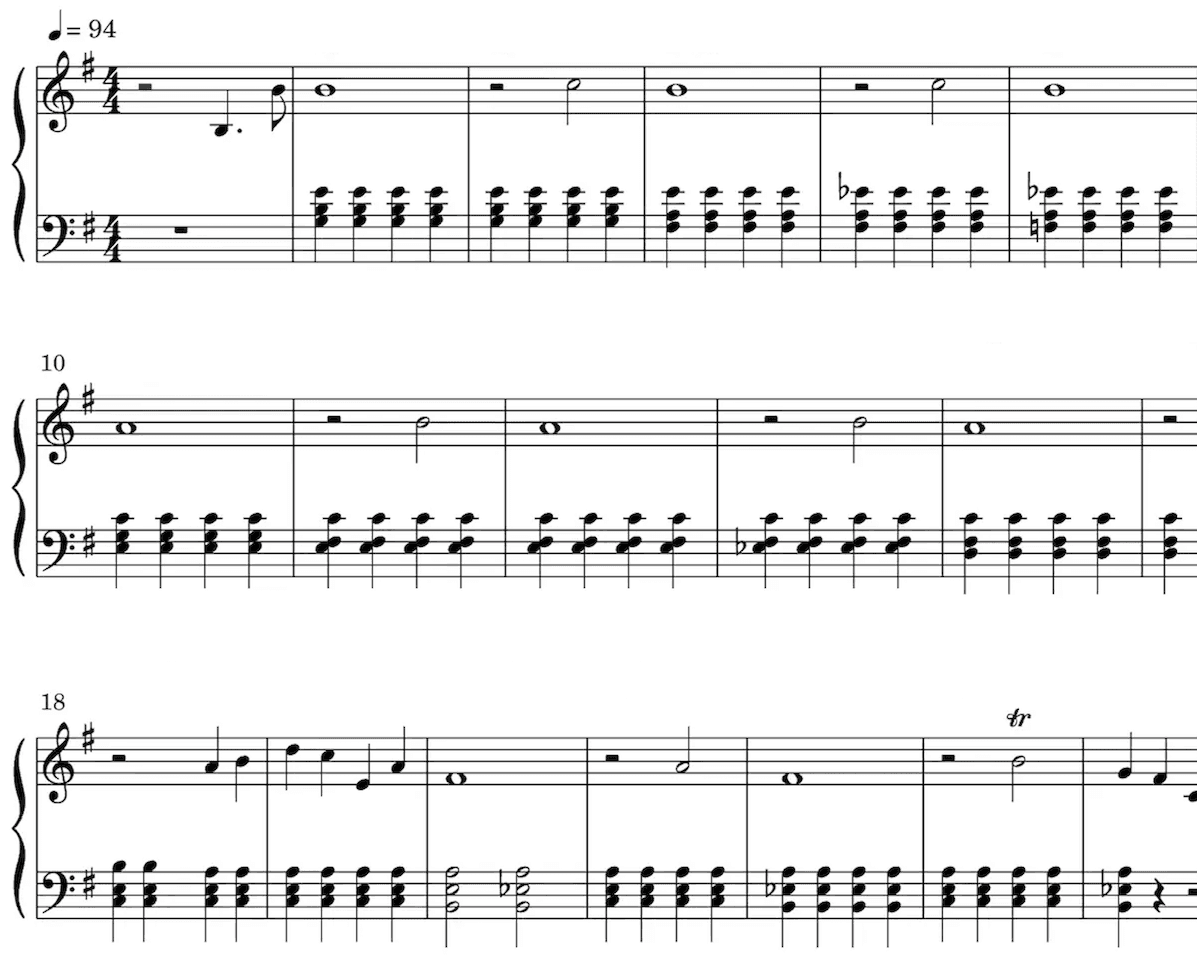
Nossa IA identifica as notas do seu áudio e escreve tudo na pauta. Ela detecta sozinha vários elementos da música, como fórmula de compasso, armadura de clave, trinados e staccato.
A partitura é especialmente útil para quem tem formação clássica, estuda música, dá aula ou compõe.
Reproduza a partitura para ouvir a transcrição.
Deixe a reprodução mais rápida ou mais lenta, do jeito que preferir.
Edite a transcrição.
Adorado por quem faz música no mundo todo
Junte-se a milhares de pessoas que já mudaram o jeito de criar música com o Songscription
"Tem tantas músicas que eu sempre quis tocar, mas nunca achava a partitura. O Songscription finalmente resolve esse problema. Agora é só passar o áudio por ele e começar a tocar."
Tomer
"Compus uma música que vive no meu coração há anos, uma peça muito pessoal que eu nunca consegui compartilhar direito. Graças ao Songscription, finalmente consegui passá-la para partitura. Agora minha composição pode ser tocada e apreciada não só por mim. É um sonho que tenho desde que escrevi aquelas notas pela primeira vez."

Tony
"Tem tantas músicas que escrevi ao longo da vida e que guardo nas mãos, mas nunca consegui passar adiante. O Songscription abriu uma porta nova. Pela primeira vez, tenho uma cápsula do tempo duradoura da minha música, que qualquer pessoa, em qualquer lugar, pode tocar, hoje e por muito tempo ainda."

"Eu crio no piano, e o Songscription organiza minha bagunça e transforma tudo em partitura de verdade."

Jeff
"O Songscription me ajudou a transcrever minhas próprias gravações ao vivo e transformou uma tarefa maçante e demorada em algo que já me poupou horas e horas."

Yameen Sekandari
Na imprensa
Perguntas frequentes
Ainda tem dúvidas? Fale com a gente
Can I get easy piano sheet music for any song?
Yes, as long as you have a recording of it. Upload the audio or video, or paste a YouTube, TikTok or Instagram link, then pick a beginner-friendly level. Songscription writes a solo piano version even when the original has no piano in it.
Which difficulty level should a beginner pick?
Start with Beginner–Intermediate, which uses simpler textures with fewer notes under each hand. If it feels comfortable, regenerate the song at Intermediate. Each switch takes about 30 seconds.
What does the Adaptive setting do?
Adaptive is the default. It stays as close to the recording as possible. Choose one of the other four levels when you want the arrangement aimed at a particular skill level instead.
Is this the same as making an existing score easier?
No. This page starts from a recording and arranges the song at the level you choose. If you already have the sheet music as a MusicXML file and want an easier version of that exact score, use the Sheet Music Leveler instead.
Can I get easy piano sheet music for free?
Sim. Você pode transcrever quantos trechos de 30 segundos quiser de graça, e há um teste gratuito para arquivos mais longos. Os planos pagos dão mais tempo de transcrição e aceitam arquivos mais longos.
How do I get an easy piano version of a song?
Give Songscription the recording, choose a difficulty level, and it writes a solo piano arrangement pitched at that level. Play it straight away, or regenerate it easier or harder until it fits.
- Add the song. Upload an MP3, WAV, M4A or video file, paste a link, or record it in your browser.
- Pick a level. Choose one of the five difficulty settings. Adaptive is selected unless you change it.
- Try a few bars at the keys. If it is a stretch, regenerate one level down. If it feels thin, go one level up.
- Print it or keep practicing. Download the PDF for your music stand, or keep learning on screen with the piano roll.
What changes between the five difficulty levels?
Every level is a fresh arrangement of the recording rather than a copy with notes deleted. The lower levels thin out the texture so each hand has less to do, while the higher ones keep more harmony and movement.
To hear one tune worked through every setting, read one song at five difficulty levels. Our guide to sheet music difficulty levels explains how printed music is usually graded.
| Level | What you get | A good fit when |
|---|---|---|
| Adaptive | As close to the recording as possible | You want the song the way it sounds on the record |
| Beginner–Intermediate | Simpler textures, fewer notes under each hand | You are still finding your way around both clefs |
| Intermediate | A fuller sound that is still comfortable under two hands | You read both hands together with some confidence |
| Intermediate–Advanced | Denser harmony and more movement between the hands | You are ready for a piece that pushes you a little |
| Advanced | The hardest version, with the most detail | You want every voice and fill you can get |
Can I switch levels once the arrangement is done?
Yes. On the transcription page you can regenerate the cover at another difficulty, and the new version is ready in about 30 seconds. Each level is regenerated from the original recording.
That makes it easy to grow with a song. Learn the Beginner–Intermediate version first, then step up once your hands know the tune. Because every version comes from the same recording, moving up feels like adding detail to a song you already know rather than starting from scratch.
Want the full-texture arrangement of a song rather than an easy one? The piano cover creator is built for that.
How do I actually learn the easy version?
Read it from the sheet, watch it on the piano roll, or switch between the two as you go.
- Slow playback down until every note is comfortable, then bring the speed back up bit by bit
- Hide one hand on the roll and practice the other on its own
- Turn on finger numbers to see a suggested finger for each note, from 1 for the thumb to 5 for the pinky
- Show note names on the active notes while you are still learning the keyboard