Features
Transcribe or Arrange
Transcription mode captures the exact notes from a recording. Arrangement mode writes a new MIDI part for your instrument, even if the original track doesn't have one.
Velocity and Timing Intact
The MIDI captures how hard each note was played and when. Drop it into your session and the feel is already there. Tweak instead of rebuild.
Works with Every Major DAW
Standard .mid files that open in Ableton, Logic Pro, FL Studio, GarageBand, Pro Tools, Cubase, Reaper, Studio One, and Bitwig. Drag and drop.
Example Transcriptions
Click on the cards to see Songscription in action.
Visualize the MIDI Output
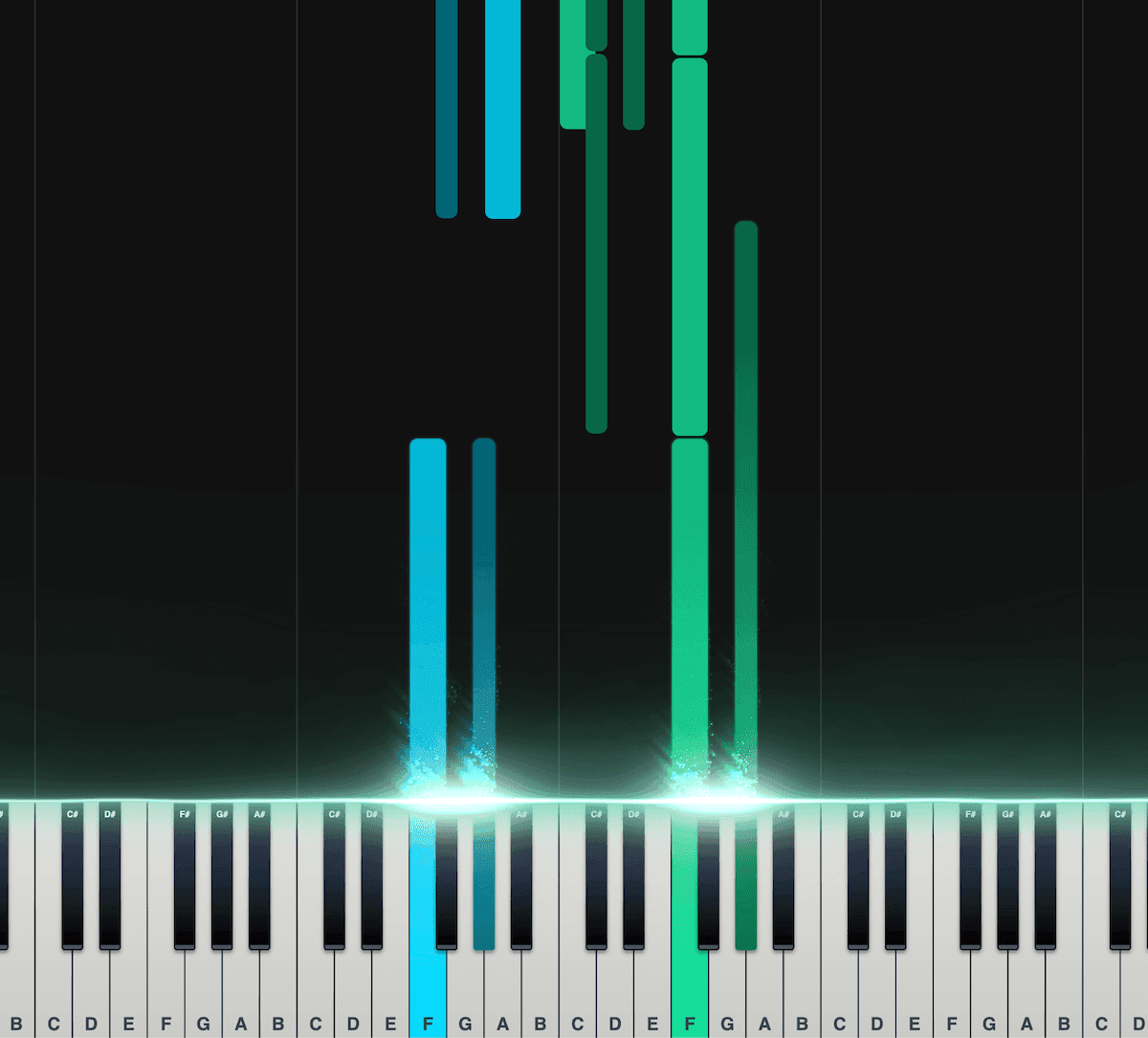
Piano Roll
Our interactive piano roll displays each note as it falls onto the piano keyboard, so you can see exactly what's being played and when.
Great for musicians who may not have a lot of experience reading other notation formats, such as sheet music.
Split the notes into left and right hands.
Control the speed, transposition, colors, and more.
Export as a MIDI file for use in your DAW.
Loved by musicians worldwide
Join thousands of musicians who have transformed their creative process with Songscription
"There are so many songs I've wanted to play but could never find the sheet music for. Songscription finally solves that problem; now I can just run the audio through and start playing."
Tomer
"I've composed a song that has lived in my heart for years - a deeply personal piece that I've never been able to share properly. Thanks to Songscription, I've finally translated it into sheet music. Now my composition can be performed and appreciated beyond just my own playing - a dream I've had since I first wrote those notes."

Tony
"There are so many songs I've written throughout my life that I hold in my hands but have never been able to pass on. Songscription opened a new door. For the first time, I have a lasting time capsule of my song that anyone, anywhere, can play, now and far into the future."

"I create at the piano, and Songscription cleans up my mess into real sheet music."

Jeff

"Songscription has helped me transcribe my own live recordings, transforming a mundane & time-consuming task into something that has saved me countless hours."

Yameen Sekandari
As seen in...
Frequently Asked Questions
More questions? Contact us
Is Songscription free to use?
Yes. You can transcribe unlimited 30-second clips for free, with a free trial for longer ones. Paid plans give you more transcription time and support for longer files.
Does the MIDI include velocity data?
Yes. Notes that were played harder come through louder in your DAW. The timing and dynamics of the original performance carry over, so you start with something that feels right.
Which DAWs work with the output?
All of them. Standard .mid format: Ableton, Logic Pro, FL Studio, GarageBand, Pro Tools, Cubase, Reaper, Studio One, Bitwig. Drag the file into a MIDI track.
What if the instrument I want isn't in the recording?
Use arrangement mode. It writes an original MIDI part for your instrument based on the song's melody and harmony, even if that instrument never appears in the original.
How long does it take?
Most tracks finish in under two minutes. Longer recordings may take a few minutes more.