Features
Paste the Link, That's It
No downloading the video, no YouTube-to-mp3 step, no file juggling. Drop the URL in and the transcription starts from the video's audio.
MIDI for One Part or Every Part
Pick the instrument you want and we isolate it from the mix before converting. Run the same link once per part to build out a full session.
Drops Straight Into Your DAW
The .mid file carries pitch, timing, and velocity. Drag it onto a MIDI track in Ableton, FL Studio, Logic, GarageBand, or any other DAW.
Preview the MIDI Before You Download
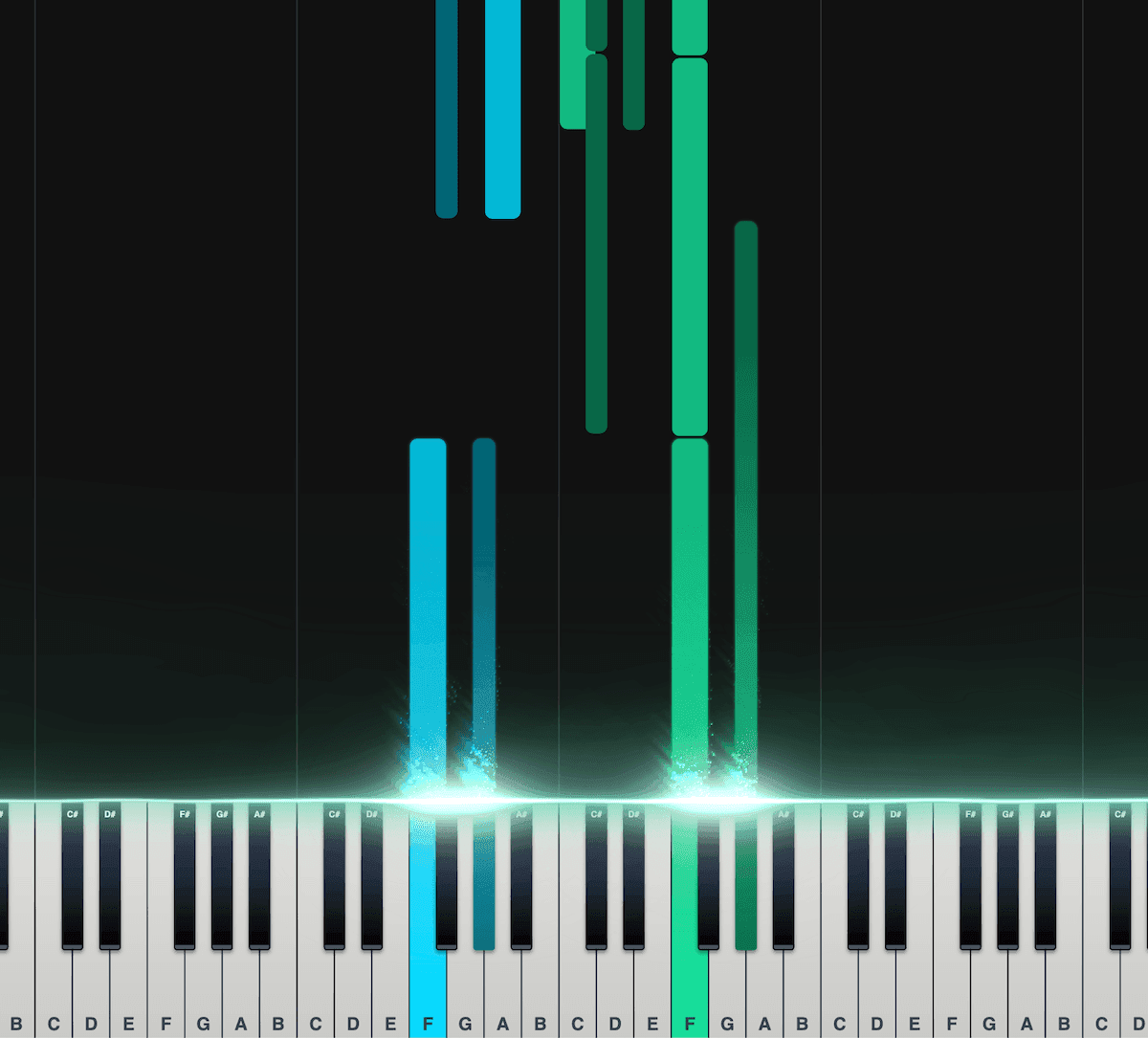
Piano Roll
Our interactive piano roll displays each note as it falls onto the piano keyboard, so you can see exactly what's being played and when.
Great for musicians who may not have a lot of experience reading other notation formats, such as sheet music.
Split the notes into left and right hands.
Control the speed, transposition, colors, and more.
Export as a MIDI file for use in your DAW.
Loved by musicians worldwide
Join thousands of musicians who have transformed their creative process with Songscription
"There are so many songs I've wanted to play but could never find the sheet music for. Songscription finally solves that problem; now I can just run the audio through and start playing."
Tomer
"I've composed a song that has lived in my heart for years - a deeply personal piece that I've never been able to share properly. Thanks to Songscription, I've finally translated it into sheet music. Now my composition can be performed and appreciated beyond just my own playing - a dream I've had since I first wrote those notes."

Tony
"There are so many songs I've written throughout my life that I hold in my hands but have never been able to pass on. Songscription opened a new door. For the first time, I have a lasting time capsule of my song that anyone, anywhere, can play, now and far into the future."

"I create at the piano, and Songscription cleans up my mess into real sheet music."

Jeff

"Songscription has helped me transcribe my own live recordings, transforming a mundane & time-consuming task into something that has saved me countless hours."

Yameen Sekandari
As seen in...
Frequently Asked Questions
More questions? Contact us
Can I convert a YouTube video to MIDI for free?
Yes. Clips up to 30 seconds convert free with no sign-up, which covers testing a hook or a riff before you commit. A free trial handles longer videos, and paid plans add more transcription time and longer files.
Is it legal to convert YouTube videos to MIDI?
It depends on the music and what you do with the result. Your own uploads, royalty-free tracks, and public domain pieces carry no issue. For copyrighted songs, transcribing to MIDI for private practice or study is generally treated like transcribing by ear, while publishing, selling, or performing the result needs permission from the rights holder.
What is the difference between YouTube to MIDI and YouTube to mp3?
An mp3 is a recording of the sound; MIDI is the notes behind it. A YouTube to mp3 converter gives you a fixed audio file you can only listen to. A YouTube to MIDI converter listens to that audio and writes out the pitches, timing, and velocity as editable data you can re-voice, transpose, and rearrange in a DAW.
Can I convert a YouTube link to MIDI without downloading anything?
Yes. Everything runs in the browser: paste the URL and the only thing that ever lands on your disk is the finished .mid file. There is no app to install, no browser extension, and no video download.
How do I convert a YouTube video to MIDI?
Paste the link and pick an instrument. Songscription pulls the audio from the video, transcribes the notes with AI, and hands you a MIDI file to download. There is no video download and no mp3 conversion step in between.
- Paste the YouTube URL. Drop the link into the box above. Instagram Reels and TikTok links work the same way.
- Pick your instrument. Piano, guitar, bass, drums, vocals, and more. We isolate that part from the mix so its notes come through clean.
- Download the MIDI. Preview the notes on the piano roll, fix anything that needs it, and export the .mid file. MusicXML and sheet music come from the same run.
Do I need to download the video first?
No. The link is the input. Most YouTube to MIDI workflows make you rip the video to mp3 with a separate converter, then upload that file somewhere else. Here the URL alone starts the conversion, so going from a YouTube link to a MIDI file is one step instead of three.
That matters beyond convenience: no converter sites, no stray video files on your disk, and it works the same on a phone as on a studio machine.
How accurate is the MIDI?
Good enough to build on, not always note-perfect. Clean, single-instrument audio (a solo piano video, an isolated guitar take) transcribes with high accuracy. Dense mixes are harder: when several instruments share the same frequencies, expect the occasional missed or extra note.
Two things tilt the odds your way. First, transcribe one instrument at a time and let the isolation do its work rather than converting the whole wall of sound at once. Second, skim the result in the built-in editor before you export: fixing three wrong notes in the browser beats hunting them down later in your DAW piano roll. Our explainer on monophonic versus polyphonic transcription covers why single lines convert more reliably than thick chords.
How do I get the MIDI into my DAW?
Drag the .mid file onto a MIDI track and assign an instrument. Every major DAW treats an imported MIDI file the same way, and the notes, timing, and velocity all come through.
We keep step-by-step walkthroughs for the common setups: using Songscription with Ableton Live, with GarageBand, and a general guide to importing MIDI into any DAW.