Features
Choose How Hard It Is
Pick a difficulty before you start. Beginner–Intermediate puts fewer notes under each hand, Advanced keeps the most detail, and Adaptive stays close to the recording.
Change Levels in Seconds
From the transcription page, regenerate the arrangement at another level in about 30 seconds. Each version is rebuilt from the recording, not trimmed down from another one.
Learn It, Not Just Read It
Play along with a falling-note piano roll at slower speeds, with finger numbers on the roll and the sheet to show which finger goes where.
Example Transcriptions
Click on the cards to see Songscription in action.
Your Song, Written for Your Hands
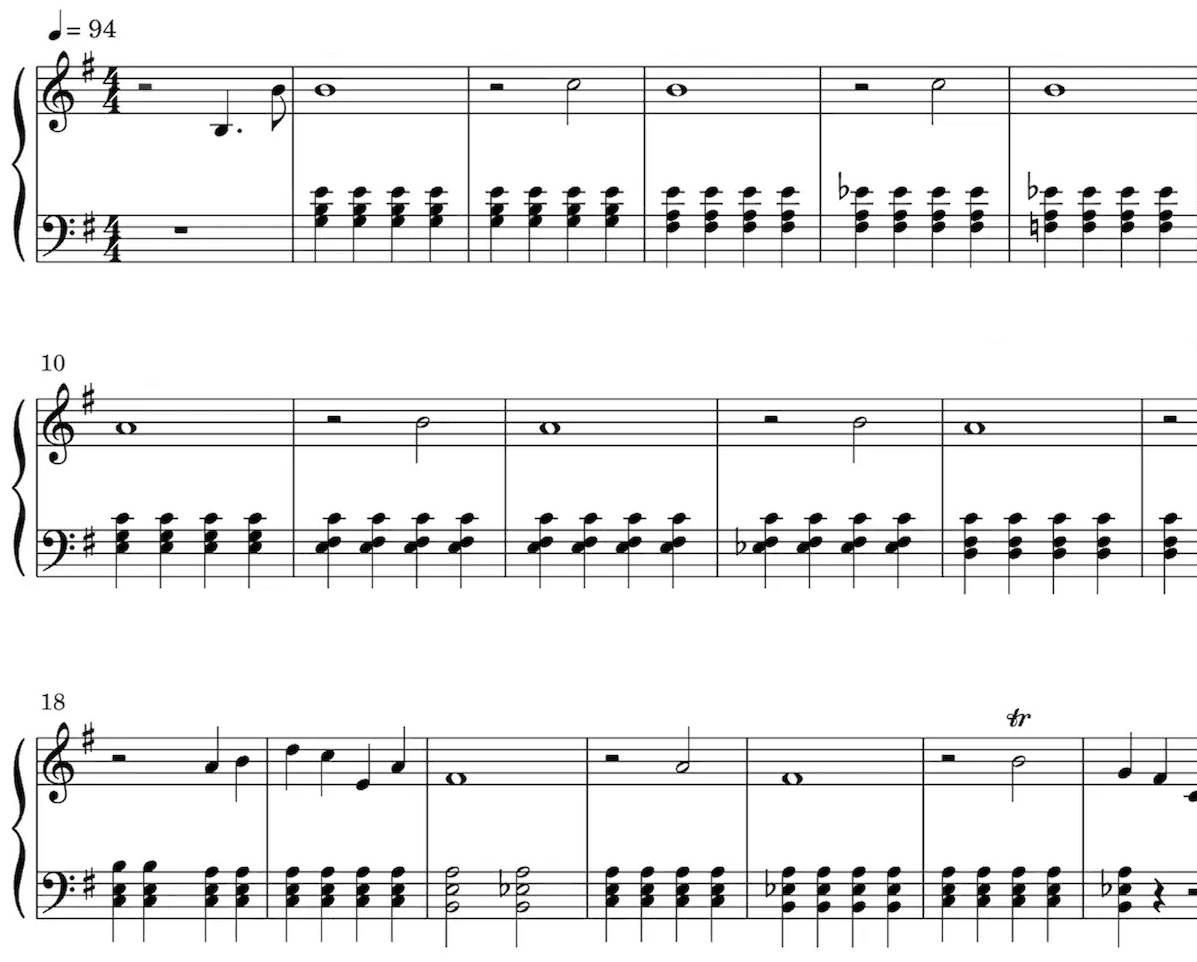
Sheet Music
Our AI technology picks out the notes from your audio and intelligently notates them on a musical staff, automatically detecting a wide range of musical features including time and key signature, trills, staccato, and other expressive markings.
Sheet music is especially valuable for classically trained musicians, music students, music teachers, and composers.
Playback the score to hear the transcription.
Speed it up or slow it down to your liking.
Edit the transcription.
Loved by musicians worldwide
Join thousands of musicians who have transformed their creative process with Songscription
"There are so many songs I've wanted to play but could never find the sheet music for. Songscription finally solves that problem; now I can just run the audio through and start playing."
Tomer
"I've composed a song that has lived in my heart for years - a deeply personal piece that I've never been able to share properly. Thanks to Songscription, I've finally translated it into sheet music. Now my composition can be performed and appreciated beyond just my own playing - a dream I've had since I first wrote those notes."

Tony
"There are so many songs I've written throughout my life that I hold in my hands but have never been able to pass on. Songscription opened a new door. For the first time, I have a lasting time capsule of my song that anyone, anywhere, can play, now and far into the future."

"I create at the piano, and Songscription cleans up my mess into real sheet music."

Jeff

"Songscription has helped me transcribe my own live recordings, transforming a mundane & time-consuming task into something that has saved me countless hours."

Yameen Sekandari
As seen in...
Frequently Asked Questions
More questions? Contact us
Can I get easy piano sheet music for any song?
Yes, as long as you have a recording of it. Upload the audio or video, or paste a YouTube, TikTok or Instagram link, then pick a beginner-friendly level. Songscription writes a solo piano version even when the original has no piano in it.
Which difficulty level should a beginner pick?
Start with Beginner–Intermediate, which uses simpler textures with fewer notes under each hand. If it feels comfortable, regenerate the song at Intermediate. Each switch takes about 30 seconds.
What does the Adaptive setting do?
Adaptive is the default. It stays as close to the recording as possible. Choose one of the other four levels when you want the arrangement aimed at a particular skill level instead.
Is this the same as making an existing score easier?
No. This page starts from a recording and arranges the song at the level you choose. If you already have the sheet music as a MusicXML file and want an easier version of that exact score, use the Sheet Music Leveler instead.
Can I get easy piano sheet music for free?
Yes. You can transcribe unlimited 30-second clips for free, with a free trial for longer ones. Paid plans give you more transcription time and support for longer files.
How do I get an easy piano version of a song?
Give Songscription the recording, choose a difficulty level, and it writes a solo piano arrangement pitched at that level. Play it straight away, or regenerate it easier or harder until it fits.
- Add the song. Upload an MP3, WAV, M4A or video file, paste a link, or record it in your browser.
- Pick a level. Choose one of the five difficulty settings. Adaptive is selected unless you change it.
- Try a few bars at the keys. If it is a stretch, regenerate one level down. If it feels thin, go one level up.
- Print it or keep practicing. Download the PDF for your music stand, or keep learning on screen with the piano roll.
What changes between the five difficulty levels?
Every level is a fresh arrangement of the recording rather than a copy with notes deleted. The lower levels thin out the texture so each hand has less to do, while the higher ones keep more harmony and movement.
To hear one tune worked through every setting, read one song at five difficulty levels. Our guide to sheet music difficulty levels explains how printed music is usually graded.
| Level | What you get | A good fit when |
|---|---|---|
| Adaptive | As close to the recording as possible | You want the song the way it sounds on the record |
| Beginner–Intermediate | Simpler textures, fewer notes under each hand | You are still finding your way around both clefs |
| Intermediate | A fuller sound that is still comfortable under two hands | You read both hands together with some confidence |
| Intermediate–Advanced | Denser harmony and more movement between the hands | You are ready for a piece that pushes you a little |
| Advanced | The hardest version, with the most detail | You want every voice and fill you can get |
Can I switch levels once the arrangement is done?
Yes. On the transcription page you can regenerate the cover at another difficulty, and the new version is ready in about 30 seconds. Each level is regenerated from the original recording.
That makes it easy to grow with a song. Learn the Beginner–Intermediate version first, then step up once your hands know the tune. Because every version comes from the same recording, moving up feels like adding detail to a song you already know rather than starting from scratch.
Want the full-texture arrangement of a song rather than an easy one? The piano cover creator is built for that.
How do I actually learn the easy version?
Read it from the sheet, watch it on the piano roll, or switch between the two as you go.
- Slow playback down until every note is comfortable, then bring the speed back up bit by bit
- Hide one hand on the roll and practice the other on its own
- Turn on finger numbers to see a suggested finger for each note, from 1 for the thumb to 5 for the pinky
- Show note names on the active notes while you are still learning the keyboard