Features
Numbers in Both Views
Each note gets a finger label on the falling-note piano roll and a matching number on the sheet music, so the hand shape you watch is the hand shape you read.
Works on Files You Already Own
Import a MIDI or MusicXML file and fingerings are generated for it too. Useful for pieces exported from a DAW, downloaded, or written in notation software.
Show Them or Hide Them
A Finger numbers switch puts them on the score or clears them away. New scores open with sheet fingerings hidden, so flip it on when you want guidance.
Example Transcriptions
Click on the cards to see Songscription in action.
Finger Numbers on the Page and the Roll
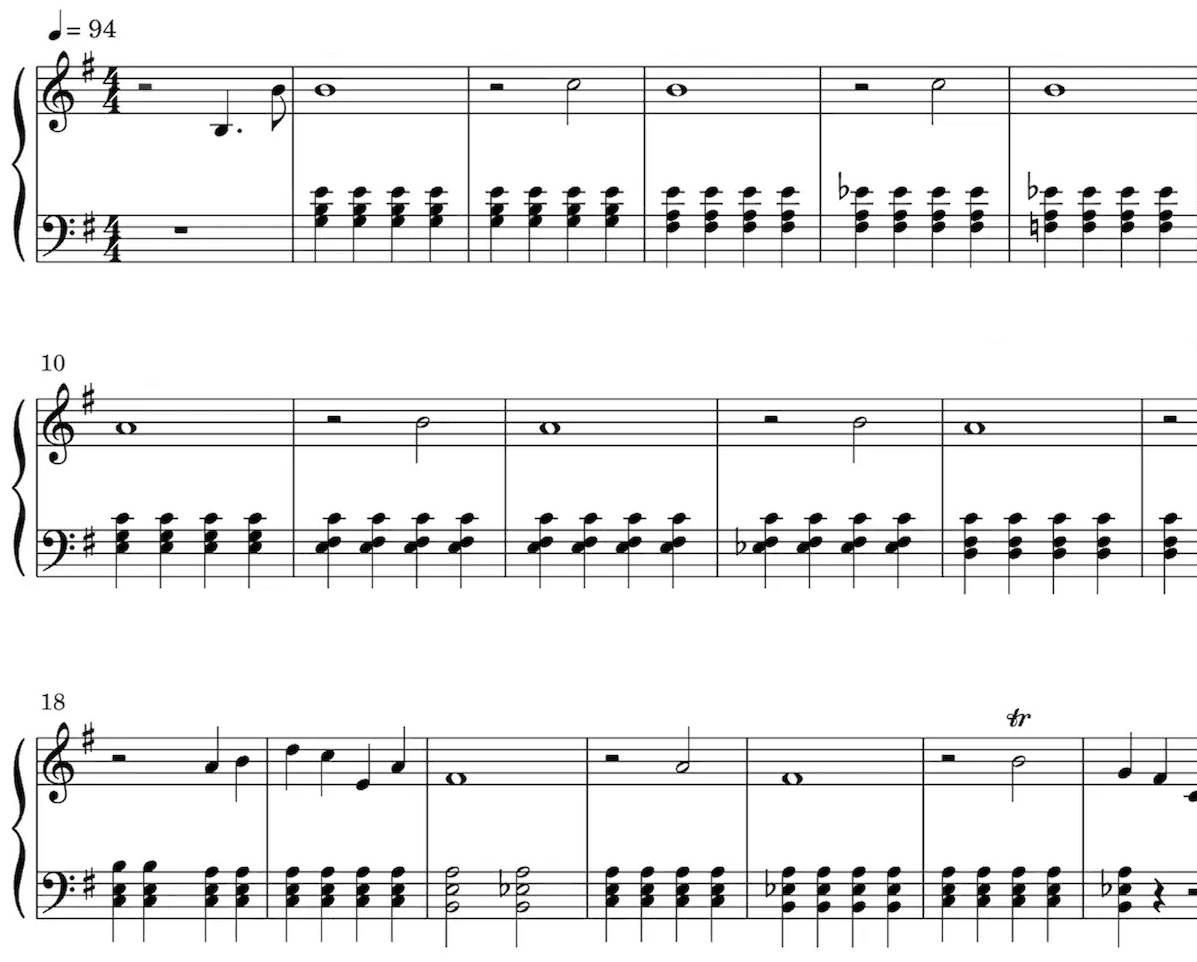
Sheet Music
Our AI technology picks out the notes from your audio and intelligently notates them on a musical staff, automatically detecting a wide range of musical features including time and key signature, trills, staccato, and other expressive markings.
Sheet music is especially valuable for classically trained musicians, music students, music teachers, and composers.
Playback the score to hear the transcription.
Speed it up or slow it down to your liking.
Edit the transcription.
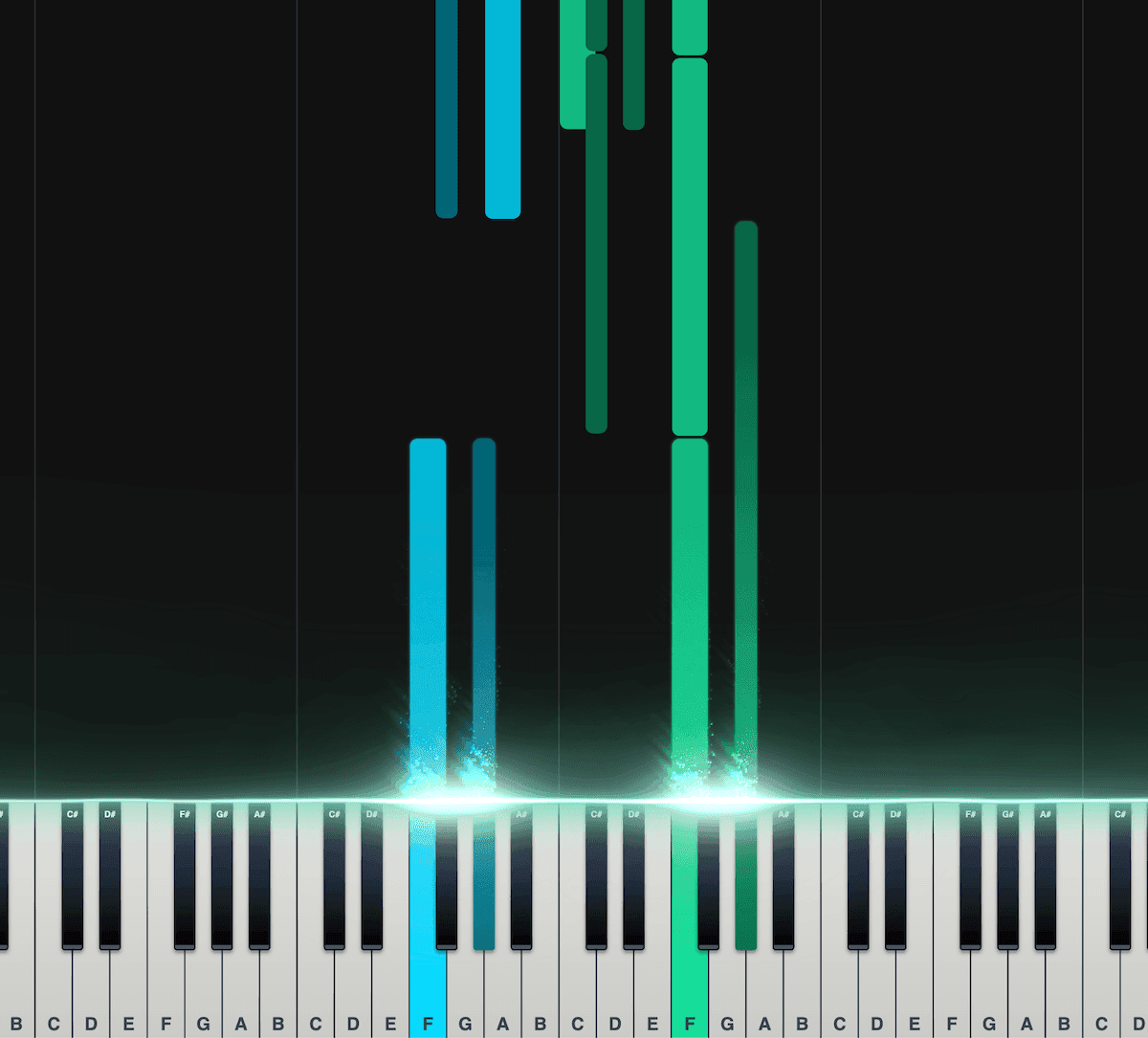
Piano Roll
Our interactive piano roll displays each note as it falls onto the piano keyboard, so you can see exactly what's being played and when.
Great for musicians who may not have a lot of experience reading other notation formats, such as sheet music.
Split the notes into left and right hands.
Control the speed, transposition, colors, and more.
Export as a MIDI file for use in your DAW.
Loved by musicians worldwide
Join thousands of musicians who have transformed their creative process with Songscription
"There are so many songs I've wanted to play but could never find the sheet music for. Songscription finally solves that problem; now I can just run the audio through and start playing."
Tomer
"I've composed a song that has lived in my heart for years - a deeply personal piece that I've never been able to share properly. Thanks to Songscription, I've finally translated it into sheet music. Now my composition can be performed and appreciated beyond just my own playing - a dream I've had since I first wrote those notes."

Tony
"There are so many songs I've written throughout my life that I hold in my hands but have never been able to pass on. Songscription opened a new door. For the first time, I have a lasting time capsule of my song that anyone, anywhere, can play, now and far into the future."

"I create at the piano, and Songscription cleans up my mess into real sheet music."

Jeff
"Songscription has helped me transcribe my own live recordings, transforming a mundane & time-consuming task into something that has saved me countless hours."

Yameen Sekandari
As seen in...
Frequently Asked Questions
More questions? Contact us
Can Songscription add finger numbers to sheet music automatically?
Yes. Piano scores get finger numbers from 1 for the thumb to 5 for the pinky, generated automatically. They appear as labels on the piano roll and as numbers on the sheet music once you switch on Finger numbers.
Can I get piano fingering for a MIDI or MusicXML file?
Yes. Import the file and Songscription generates fingerings for it, just as it does for a song transcribed from audio. You then see them on the piano roll and, with the toggle on, on the sheet.
What do the finger numbers 1 to 5 mean?
They name the fingers. 1 is the thumb, 2 the index finger, 3 the middle finger, 4 the ring finger and 5 the pinky. The same numbering is used for the left hand and the right hand.
Does the fingering generator work for guitar or other instruments?
No. Finger numbers are generated for piano only. Guitar transcriptions come with tabs and notation instead, which show the string and fret for each note.
Is the fingering generator free to try?
Yes. You can transcribe unlimited 30-second clips for free, with a free trial for longer ones. Paid plans give you more transcription time and support for longer files.
How do I add finger numbers to a piano piece?
Bring the music into Songscription as a recording or as a MIDI or MusicXML file. Fingerings are generated for the piano part automatically, and the Finger numbers switch puts them on the score.
- Choose your source. Upload audio or video, paste a YouTube, TikTok or Instagram link, record in the browser, or import a MIDI or MusicXML file.
- Let it run as piano. This page is set to piano, so the result is a two-hand score with a finger worked out for every note.
- Switch on Finger numbers. New scores open with sheet fingerings hidden. Turn the toggle on and the numbers appear with the notes.
- Practice along with the roll. Open the piano roll to see the same finger labels on the falling notes while the song plays at the speed you set.
How do you read piano finger numbers?
Each number stands for one finger, and the scheme is identical in both hands: the thumb is always 1 and the pinky is always 5. Our explainer on piano finger numbers has more practice tips.
| Number | Finger | Worth knowing |
|---|---|---|
| 1 | Thumb | Often tucks under the hand to keep a scale going |
| 2 | Index finger | Strong and nimble, a natural leader for a line |
| 3 | Middle finger | The longest finger, a common crossing point over the thumb |
| 4 | Ring finger | Weaker in most hands, so it rewards slow, separate practice |
| 5 | Pinky | Often takes the top note in the right hand and the bass note in the left |
Where do the finger numbers show up?
In two places. On the piano roll every falling note carries a finger label, and on the sheet music the numbers sit with the notes once the Finger numbers toggle is on.
Seeing one fingering in both views helps when you are learning by eye and by ear together. The roll colors each hand differently, can hide one hand, slows playback down and shows note names, so you can drill the left hand alone with its fingering in view. The piano tutorial creator page covers the roll in more depth.
Which music can the fingering generator handle?
Any piano score in your account, whether it came from a recording or from a file you imported.
Songscription cannot read PDFs, photos or printed scores, so a paper copy has to become a MIDI or MusicXML file before it can get fingerings.
- Songs transcribed from audio or video with piano transcription
- MIDI files from a DAW or a download, brought in the same way as on MIDI to sheet music
- MusicXML files exported from notation software
- Piano covers of songs that have no piano in the original
What if a suggested fingering doesn't suit my hand?
Use what works for you, and let us know. Hands come in different sizes, so a suggested fingering will not fit everyone, and you can report wrong finger numbers straight from the score.
Those reports go to the team improving the fingering model. Teachers often treat the generated numbers as a first draft to talk through with a student, adjusting a finger or two where a hand is small or a stretch is wide.